Nodes
Attribute | Description |
|---|---|
Name Description | Name of the node and optional description (multi-line). See also Naming conventions for nodes and fields. |
XML/JSON handling | See XMLNoTemplateUnit, create xml from node(), JsonCreationUnit and ExtendedJsonCreationUnit. |
Minimum Maximum | Checks the minimum and maximum occurrence of a node. |
Inactive | An inactive node is not entered/generated when the Target tree is generated. |
Only for SQL | If this option is set, the node will not be displayed in the output data. Nodes of this type are only for the interaction with databases. |
Iteration node | Only the last iteration of the node is output. See Mapping – Filling a record of the target tree. |
Path | You can either drag a source structure node onto this target structure node. In that case, the name of the source structure node is automatically entered in this attribute field. Or you search for the source structure node in a list using the folder icon. Alternatively, you can enter the name manually. In addition, you can also use the blue folder icon to select a source structure node or an Integer variable. See also Mapping – Records and paths, Path types (repetition of target structure nodes). |
Is relative path | See also the attribute "Path" and Path types (repetition of target structure nodes). |
Iteration | |
Optional settings | See EDICreationUnit, MultipleFileCreatorUnit and X12CreationUnit. NOTE: If you create nodes manually in an EDIFACT target structure, use this property to set the delimiter: |
XML namespace | This property allows an XML namespace to be assigned to the XML element generated from the field. See also XMLMemSaveTemplateParserUnit and XMLNoTemplateUnit. |
Line break | |
Sort field Sorting | See Sorting in nodes. |
Optional XPath filter | Only relevant for the XML parser V4. |
Advanced settings
You can access the advanced settings via the checkbox "All".
Attribute | Description |
|---|---|
Transaction control Database alias SQL table/procedure Empty table Optional pre-SQL execution SQL mode | See section Phase 4. |
Optimize path | If this attribute has the value |
Row offset variable | The value of the Integer variable specified in this field determines how large the offset for the nodes to be output in the target tree is. An offset of |
Step size variable | The value of the Integer variable specified in this field determines how large the step size for the nodes to be output in the target tree is. With an offset of |
Fields
Attribute | Description |
|---|---|
Name Description | Name of the field and optional description (multi-line). See also Naming conventions for nodes and fields. |
Calculation field | Indicates whether a field will be included in the output data or if it is only traversed for calculation purposes. See also the section "Calculation fields" below. |
Mandatory field | If a field is marked as a mandatory field, an error is generated if the field has an empty flag. Whether a mandatory field has been filled can be checked in a mapping test with the option "Perform min/max checks". |
Fix value | You can specify a fixed value for a field. See also Order of value assignments. |
Data type | The data type of the field. |
Length | For data with the Document type "Fixed-length", the value specified here defines the length of the field (so when this fields end and the next one starts). For data with the document type "CSV", the content of the field is shortened to the length entered here (if the attribute has the value |
Template Use template | You can specify a format template. The template is only evaluated if the data type is numeric or Date/Timestamp and the field actually has a value. The template is evaluated in the same way as the function format date/timestamp to text(), where See also Format templates for dates and times and page https://docs.oracle.com/javase/8/docs/api/java/text/DecimalFormat.html. |
Fill with | The character to be used to fill the field value up to its specified length. If more than one character is specified, only the first one will be used. |
Fill from left | Specifies whether to fill from the left ("Yes") or from the right ("No"). |
XML namespace | This attribute allows an XML namespace to be assigned to the XML element generated from the field. See also the Integration Units XMLMemSaveTemplateParserUnit and XMLNoTemplateUnit. |
Name for logging | The string |
Log field value | If set, the value assigned to the target field will be logged (starting with the string |
Optional XPath filter | Only relevant for the XML parser V4. |
Advanced settings
You can access the advanced settings via the checkbox "All".
Attribute | Description |
|---|---|
SQL column name SQL key SQL AutoGenKey Skip empty SQL value | These settings are only relevant for Phase 4. |
Calculation fields
See also Mapping – Filling a record of the target tree.
Sometimes it is necessary to perform calculations in the mapping, whereby the affected substructures must not be visible in the output data.
NOTE: Calculation fields are displayed in mapping tests and are also used for Phase 4 (SQL).
Example: The number of order items must be specified in the header data of an order. The count is determined with a variable by creating a counting node with a path to the Position node in the source structure. The counting node contains a field counterPos that increases the counter with each iteration with a function. We do not want this part of the target structure/tree to appear in the output data. This can be achieved by setting the attribute Calculation field to Yes for the field.
The following figure shows the effect of calculation fields on the target tree.
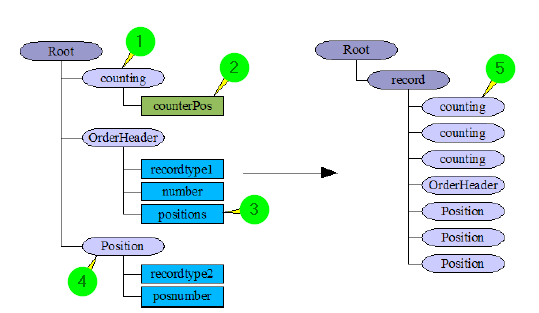
① We create a new node counting above the node OrderHeader in the target structure. The node gets the same value for attribute "Path" as node Position. This repeats node counting as often as node ④ .
② We create the field counterPos. The attribute Calculation field is set to Yes for this field. We use function calculate and save variable() on this field with the parameter a=var__COUNTERPOS, b=+ and c=1. This will increment the value of variable var__COUNTERPOS each time the function is executed. So after the last iteration, the value of the variable will be equal to the number of order items.
③ We create the field positions. We use function copy() with the parameter a=Variable var__COUNTERPOS. So the field will contain the number of positions.
④ Node Position (in the target structure) with a path to node Position in the source structure.
⑤ Node counting will be iterated as many times in the target tree as node Position. Since there is no "real" field in this node, it will be ignored when the output data is created.
It is also possible to mix calculation fields and normal fields in any order within nodes. However, nodes containing normal fields will no longer be ignored when output files are created.