The Lightweight Directory Access Protocol (LDAP) is a network protocol for distributed directory services. It lets you query and modify information over an IP network. See also LDAP (connection).
Settings
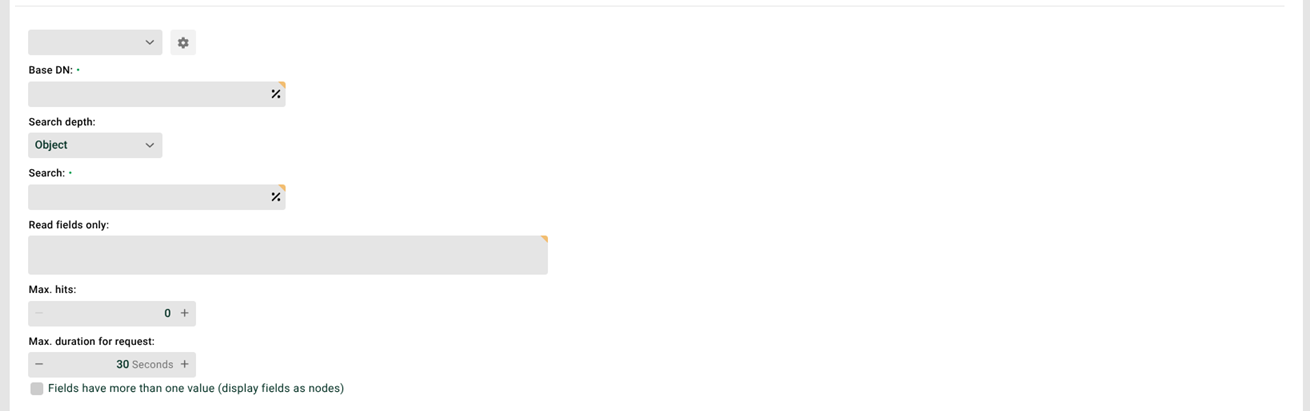
LDAP alias: Select a defined LDAP alias. See also LDAP (connection).
Gear icon: Here, you automatically generate a matching source structure. You can also test the LDAP query.
Base DN: The Base DN (baseDN, distinguished name) sets the starting point for the search in the directory tree. From there, the system searches downward for the objects you want. Example: dc=Lobster,dc=com.
Search depth: The scope of the search:
Object: exactly this object.
One layer: the layer below the Base DN.
Tree: this object and everything below it.
Search: The search filter (in LDAP syntax). Example: cn=Max*.
Read fields only: Here, you can explicitly specify the attributes to return. If you leave this field empty, the system returns all attributes. Example: SN,CN,OU.
Max hits: Here, you set the maximum number of hits the system returns. A value of 0 means no limit.
IMPORTANT:
The server itself often limits the maximum result set. A higher value in Max hits then has no effect.
You can work around this with paging. To do so, set the option
<Set name="pageSize">500</Set>in the configuration file ./etc/ldap.xmlfor the desired alias. The value 500 is just an example here.The system then handles the search like a database cursor. For example, with 1200 hits, the server reports pages of 500, 500, and 200 objects. The LDAPService retrieves pages until none remain. This way, you can also get more hits than the maximum number set on the server.