This Input agent reads data from an SAP system and passes it to the Profile as input data. To do so, it calls a remote function call (RFC) on the SAP system. A defined interface handles the data exchange. For a detailed description, see SAP RFC.
Settings
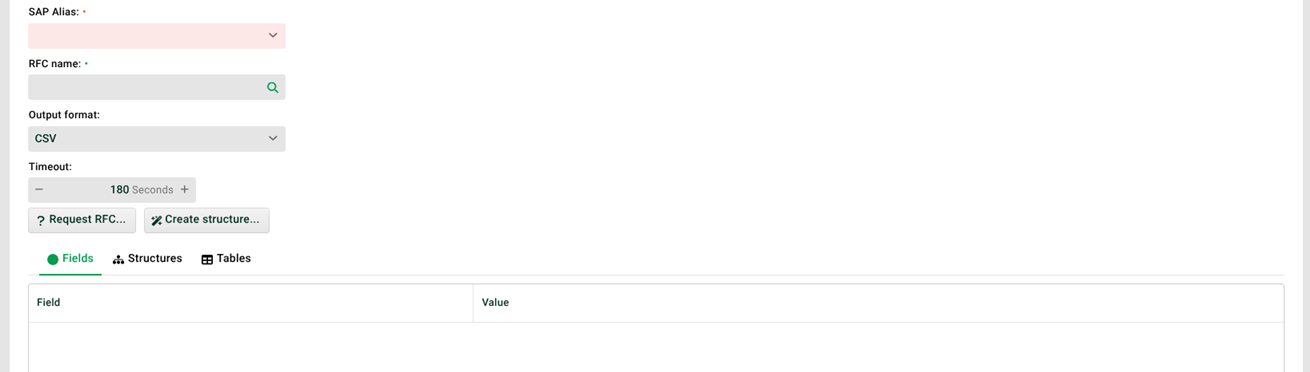
① SAP alias: The SAP alias of the connected system. You maintain the aliases in the configuration file ./etc/sap.xml.
② RFC name: The name of the function module the input agent calls on the SAP system. Example: RFC_READ_TABLE.
③ Output format: The input agent processes the data from the RFC call in one of the formats CSV, FIXRECORD, SAPXML, or XML. See also ⑥. The received data are not IDoc files.
The output format SAPXML also parses “deep data types” in the Response of the RFC or BAPI. These include:
Tables in the EXPORT parameters
Tables in tables
Parameters of type
STRINGandXSTRINGCHANGING parameters
IMPORTANT: With SAPXML, creating the source structure through ⑥ fails or returns an incorrect structure. Start a job in that case. Then create the source structure from the received response of the RFC, that is, from the backup file. See Source structure menu.
④ Timeout: Defines how long the input agent waits for a response from the SAP system. If no data arrives by then, the job terminates with an error message.
⑤ Request RFC: Queries the SAP system for the Fields, Structures, and Tables of the specified function module. The result appears in ⑦.
⑥ Create structure: Creates a source structure for the Mapping in Phase 3 from the structures and tables of the function module.
⑦ Fields, Structures, Tables: Here you fill the fields, structures, and tables with data for the call. Placeholders (see File names, file patterns, paths, placeholders) and Variables with prefix MSG_CALL_ are allowed.