This Input agent receives files over OFTP and passes them to the profile as input data.
NOTE: If several profiles are ready to accept a specific file, the Profile scoring decides which one gets it.
Settings
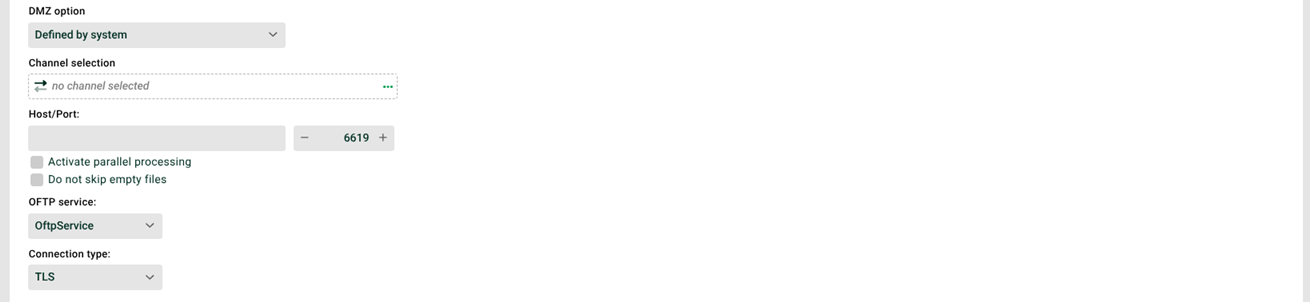
① Channel selection: OFTP channel that connects to the target system. For OFTP2, you must select a channel. If you change the connection type in ⑥ afterwards, the system removes the channel. Select the channel again in that case.
② Host/Port: Target address (IP or URL) and port, or the ISDN number. Which one applies depends on your selection in ⑥. For the port, the following rules apply:
Port
0with no channel selected: the default port from./etc/oftp.xmlapplies.Port
0with a channel selected: the port from the channel applies.Port greater than
0: that value applies.
③ Activate parallel processing: If this checkbox is set, several instances of this profile can run in parallel. The checkbox "Profile may only run in one instance" (see General (Main settings)) must not be set for this profile.
④ Do not skip empty files: If this checkbox is set, even empty files generate jobs. In a DMZ environment, you control the behavior with a startup option in the configuration file ./etc/startup.xml of the DMZ server.
<!-- Defines how to handle empty FTP, SSH and OFTP files (0=skip, 1=delete, 2=transfer) -->
<Set name="handleEmptyFiles">0</Set>0(skip, default): The empty file remains on the DMZ server. The system writes a log entry toDmzEvents.1(delete): The system deletes the empty file on the DMZ server.2(transfer): The system passes the empty file on to the profile. The setting in ④ then takes effect.
⑤ OFTP service: Name of the OFTP service. This field is relevant if several instances (see OFTP) are configured.
⑥ Connection type: The type of the OFTP connection. The following types are available:
OFTP over ISDN
OFTP over TCP/IP
OFTP over TCP/IP with TLS
System variables
Several System variables are available for OFTP, for example:
VAR_SYS_OFTP_SFIDVAR_SYS_OFTP_ORIGINATORVAR_SYS_OFTP_FILE_COUNTERVAR_SYS_MESSAGE_IDVAR_SYS_LASTINBULKVAR_SENDER