This Input agent reads documents from a MongoDB on a schedule and passes them to the Profile as input data. It determines the documents through a query on a collection.
NOTE: With this input agent, the system sets the Document type to JSON automatically.
Settings
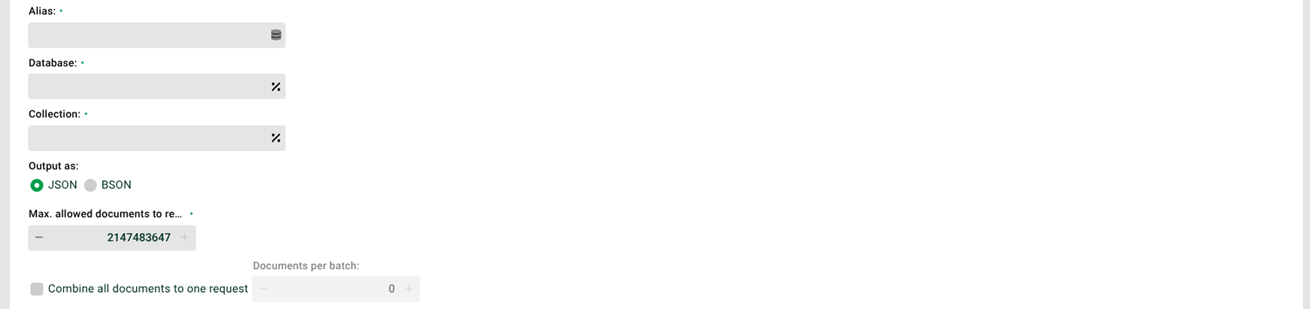
① Alias: Alias for the connection to the database. A database alias is a configured connection to a database system. See section MongoDBConnectionService. In addition, all Variables with prefix MSG_CALL_ defined in the profile are available for selection. This lets you pass the alias from a triggering profile or with an HTTP call (see Trigger/External call). Define these variables with a default value. That makes testing easier.
② Database: The database the query refers to. It corresponds to a schema in an SQL database. The alias already specifies a database through the parameter catalogName. You overwrite the value for this connection here in the input agent.
③ Collection: The collection the query refers to. It corresponds to a table in an SQL database.
④ Output as: A MongoDB stores datasets as BSON documents. BSON is a binary representation of JSON documents. However, it contains more data types than JSON. If you select BSON, the returned JSON document shows the BSON-specific data types. See the section "Output format BSON and JSON" below. See also MongoPostexecutor.
⑤ Max allowed documents to read in: If a query returns more documents than specified here, the profile reads only the specified number. It ignores all further documents. Example: With the value 20 and 22 documents found, the profile ignores documents 21 and 22. This does not generate an error.
⑥ Combine all documents to one request: If this checkbox is set, the system combines all documents found into a single JSON document. It then starts only one job. If the checkbox is not set, it returns each document found individually and starts a separate job for each one.
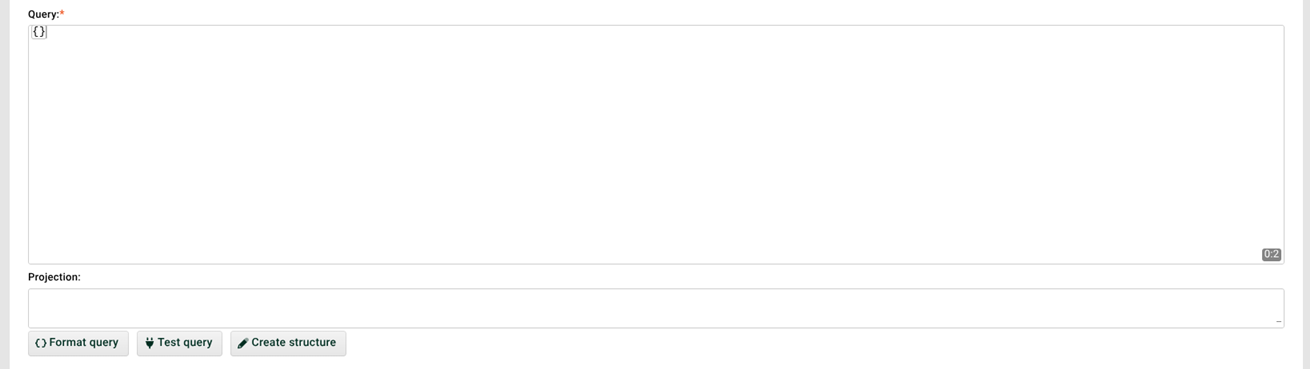
⑦ Query: The query to execute. Example: {}. For details on the query language, see the manufacturer's documentation. Through the context menu, you save queries and select saved queries. You manage them through User menu > Integration Notes > MongoDB.
The following rules also apply to this field:
Permanent Profile values
%perm:KEYNAME%are allowed. However, they work only in a profile run, not through ⑨.If you specify the query in curly braces, the system uses the
find()method. The screenshot shows this case.If you specify the query as an array in square brackets, the system automatically uses the
aggregate()method.
Example of a query with aggregate():
[
{$match: {"FAILED": "false"}},
{$group: {"_id": "$_id", "PID": {"$first": "$PROFILE_ID"}, "TOTAL": {$sum: "$JOB"}}}
]
⑧ Projection: Use this field to execute a query with projection. Example: The value {FAILED:1} executes the query find({},{FAILED:1}).
⑨ Test query: Executes the query from ⑦ as a test. The test shows only the first result dataset.
⑩ Create structure: Creates a source structure that fits the query.
CAUTION: The system overwrites an existing source structure in the process.
Output format BSON and JSON
You select the output format in ④. The following examples show the same document in both formats.
JSON
[{
  "_id": "5ea94c0cfcba7e213485e8a4",
  "JOB": 0,
  "PROFILE": "httpin",
  "PROFILE_ID": "6f6fbe3d:171c4d6b593:-7f28.d19731995bc0c589:6f6fbe3d:171c4d6b593:-8000",
  "START": "2027-04-29T11:42:36.930Z",
  "END": "2027-04-29T11:42:36.944Z",
  "FAILED": false,
  "FILENAME": "n.a.",
  "BACKUP": "Job_0",
  "CLIENT": "-1",
  "ROLE": "",
  "DISPLAY1": "",
  "DISPLAY2": "",
  "DISPLAY3": "",
  "LOGPOOL": "STANDARD"
}]
BSON
[{
  "_id": {
    "$oid": "5ea94c0cfcba7e213485e8a4"
  },
  "JOB": {
    "$numberLong": "0"
  },
  "PROFILE": "httpin",
  "PROFILE_ID": "6f6fbe3d:171c4d6b593:-7f28.d19731995bc0c589:6f6fbe3d:171c4d6b593:-8000",
  "START": {
    "$date": {
      "$numberLong": "1808991756930"
    }
  },
  "END": {
    "$date": {
      "$numberLong": "1808991756944"
    }
  },
  "FAILED": false,
  "FILENAME": "n.a.",
  "BACKUP": "Job_0",
  "CLIENT": "-1",
  "ROLE": "",
  "DISPLAY1": "",
  "DISPLAY2": "",
  "DISPLAY3": "",
  "LOGPOOL": "STANDARD"
}]