You can trigger the Profile either by another profile or by an HTTP request (using GET or POST). This is event-based control. Unlike normal profiles with scheduled input agents, this profile type can process multiple jobs in parallel.
Another profile
If you select this option, any other profile can trigger this profile. NOTE: See also the section "Second option – Message and trigger" in Profile chains.
Settings

① Can be triggered on any server: If this checkbox is not set, the checkbox "Profile may only run in one instance" (see General (Main settings)) is also not set, and no value is entered in field "Start on IS only" (see Input agents), then a load-balancing system forces a triggered cron job to stay on the Working Node where it was triggered. See also Settings for profiles (Load balancing).
② Trigger message context, Trigger message queue: You can specify an optional context (see Message (Input agent)) (default: System) and an optional queue (default: DWForwardReceiver). You must also specify these values in the calling profile. Otherwise, communication continues to use the default values.
HTTP request
If you select this option, you can call the profile via HTTP.
NOTE: See also Crontab syntax & HTTP trigger and HTTP.
Settings

① Triggered by HTTP request: Specifies whether an HTTP request (GET or POST) can trigger the profile. If you enable this option, another profile can still trigger the profile as well.
② URL address suffix: Specifies the string that the HTTP request must end with. See the section "Request procedure" below for the full URL.
③ Send HTTP response only after the cron job ends: If you enable this option, the system returns the HTTP response only after the job for the profile has finished. See also the sections "Response procedure", "Response header", and "Response status" below.
IMPORTANT: If the job takes a long time, the HTTP request's remote endpoint may time out.
④ Return data: You can select this checkbox only if ③ is set. If you select this checkbox and the response uses one of the custom classes PassBackDataResponse, PassBackBinaryDataResponse, DefaultWebserviceResponse, or DefaultWebserviceResponseBinary, the HTTP response includes the class's output data. See also Profile chains.
⑤ MIME type: Here you can specify the MIME type of the HTTP response. NOTE: For normal text, you can use the default value text/html.
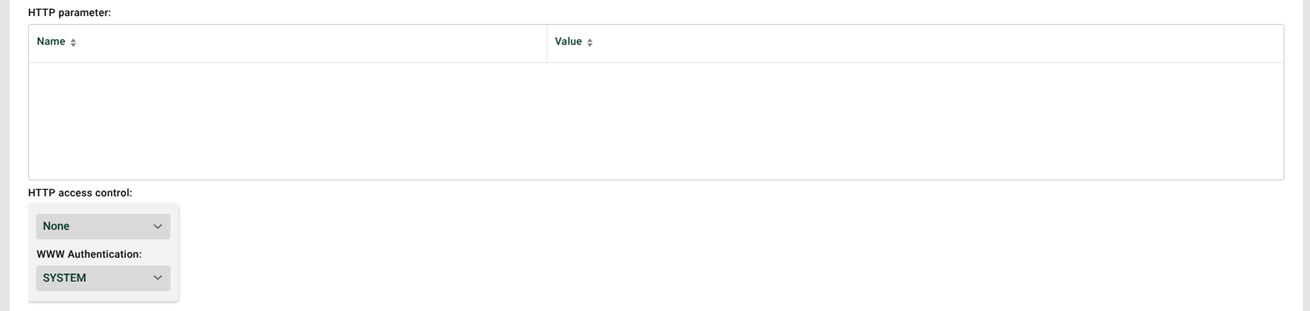
⑥ HTTP parameters: Defines the required parameters for requests. See sections "Request procedure" and "Request parameters" below for details.
⑦ HTTP access control: If authentication is required, you can either specify a username and password explicitly, or select a partner channel whose credentials (Your access) the system then uses. See also System variables MSG_CALL_HTTP_AUTH_USER.
⑧ WWW authentication: The authentication method (BASIC, DIGEST, OAUTH2, SYSTEM).
For
SYSTEM, the system uses theforceDigestAuthenticationsetting from the configuration file./etc/startup.xml.If you use
OAUTH2, you must specify an HTTP channel with OAUTH2 configuration in ⑦.
Schematic structure of the HTTP address
To send data to a profile via HTTP, or to start it via HTTP, you must call a specific URL. The schematic structure of the URL is:
<protocol>://<server>:<port><URL context>/<URL suffix><query> |
Placeholder | Description |
|---|---|
<protocol> |
|
<server> and <port> | Here, the system expects the DNS name or IP address of the Integration Server, and optionally the port number, as configured for the HTTP listener and/or HTTPS listener (see Adding an HTTP listener). You don't need to specify the default ports ( |
<URL context> | When you access a profile with an event based Input agent "HTTP", the system normally uses You can change these default settings system-wide in the configuration file |
<URL suffix> | You configure this in the input agent in the profile. |
<query> | Here you can pass additional call parameters. Formal structure: |
Request procedure
By default, the HTTP servlet responds to both the HTTP context /dw/trigger and /dw/Trigger.
|
For an incoming request, the HTTP servlet first looks for the matching profile. It considers all active profiles that have a scheduled input agent with schedule type Trigger/External call or CronTab syntax & HTTP trigger, and whose suffix ② matches the suffix in the request.
|
In addition, the HTTP request parameters must match the HTTP request parameter definition ⑥. For example, if ② contains the value myprofile and the parameter list ⑥ contains two parameters (p1=value1, p2=value2), the URL must look like this:
|
The system triggers the first matching profile. If the profile requires authentication ⑦, the system triggers it only after successful authentication. The system ignores any other profiles that also match the conditions.
Request parameters
Defining mandatory request parameters
You can specify which parameters must be present at minimum in the respective HTTP request. The following figure shows an example of how to define the HTTP request parameters.
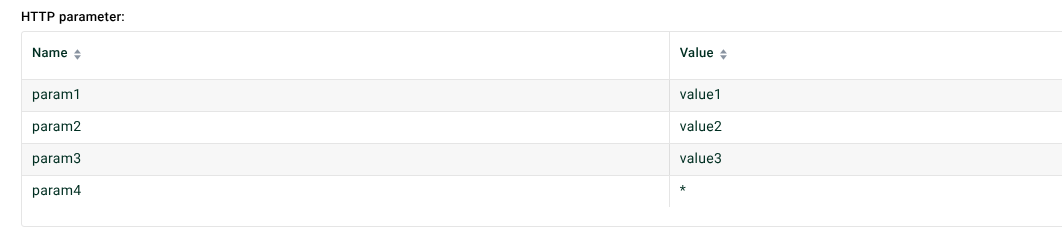
⑨ Parameter name: Name of the HTTP request parameter that must be present.
NOTE: You can use system constants. If you want to allow multiple values for a parameter, you can create the parameter name multiple times.
⑩ Value: If you enter a value in this field, the parameter must have exactly this value in the HTTP request. If you enter the symbol * in this field instead of a value, the parameter can have any value in the HTTP request. This way, you can specify that the parameter only needs to be present in the request.
NOTE: You can use system constants and regular expressions with the prefix regex: or regex2 (see File names, file patterns, paths, placeholders)
The example accepts the following HTTP requests.
|
|
|
The example does not accept the following HTTP requests.
|
|
If multiple profiles have the same URL suffix and a matching HTTP request parameter definition for an incoming HTTP request, these profiles are equally ready to accept the request. In this case, the system uses the first matching profile.
Reading HTTP request parameters
You can access the values of HTTP request parameters through variables using the following syntax.
|
For example, within the profile, you can access the parameters param1 and param2 of the following HTTP request through the variables MSG_CALL_PARAM1 and MSG_CALL_PARAM2.
|
Request headers
You can read request headers with the System variables MSG_CALL_HEADER_HTTP_<header name in uppercase letters>.
Additional system variables:
MSG_CALL_HEADER_HTTP_METHODMSG_CALL_HEADER_HTTP_PROTOCOLMSG_CALL_HEADER_HTTP_REMOTE_HOSTMSG_CALL_HEADER_HTTP_URIMSG_CALL_HTTP_AUTH_USERMSG_CALL_HEADER_HTTP_QUERY
Response procedure
There are several options for the response.
By default, if ③ is not set, the system returns the text OK as the response on success. This only means that the profile was triggered successfully. If an error occurs in the profile, the response does not show it. If the system could not trigger the profile, you get a message that no matching profile was found.
If ③ is set, after a successful profile run, the system returns the text OK as the response, followed by a colon and the job number. If an error occurs in the profile, the system returns the profile's error message. If ④ is also set, after a successful profile run, the class supplies the response (see above).
You can also store the response for success and for error as text files. You can create these files directly in ② using the pencil icon. If the respective file exists, is readable, and is not empty, the system returns the file content as the response to the HTTP client. If you want to edit these files manually, you can find them at the following path. The placeholder <URL suffix> stands for the value in ②. If ② uses a path separator /, for example path/myprofile, you must replace the path separator with _, for example path_myprofile.ok.
Success |
|
Error |
|
Response header
If you set ③ or ④, and you create System variables in the form VAR_RESPONSE_HTTP_HEADER_<response header name>, the system sets the corresponding response headers with the variables' initial values. Example: The variable VAR_RESPONSE_HTTP_HEADER_Test with the initial value mytest creates the HTTP response header Test with the value mytest.
NOTE: The system ignores the response header Content-Length, which means you cannot overwrite it.
Response status
If the system triggers the profile successfully and ③ and ④ are not set, the response status is 200, even if an error occurs in the profile.
If you set ③ or ④, the response status is 200 if the profile ran successfully. If an error occurs in the profile, the response status is always 500. In both cases, on success, you can also overwrite the response status 200 with the system variable VAR_RESPONSE_HTTP_HEADER_RESP_STATUS. However, the system always uses only the variable's initial value (Phase 3 must be active). It does not take later changes to the variable value into account.