
Less than 60 minutes
You specify a number of minutes or seconds after which the job runs again. If you specify less than one hour, the job pauses for that time and then restarts.
The following figure shows the sequence for an interval setting of 30 minutes and a job runtime of 10 minutes.
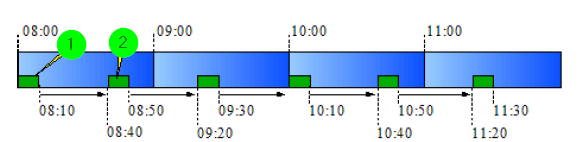
① A job starts at 08:00 and runs for 10 minutes. Then the Profile pauses for 30 minutes.
② A job starts at 08:40 and runs for 10 minutes. Then the profile pauses again for 30 minutes.
From 60 minutes
For interval times of 60 minutes or more, the scheduler uses a different algorithm. The system calculates the next start time when you save the profile, when a cron job run finishes, or when the Integration Server starts.
Example:
The following assumptions apply:
Calculation time: 2019-10-12 03:02:33 PM
"Valid from" (see General (Main settings)) value in the profile: 2019-01-01 01:17 PM
The interval value is 90 minutes.
Sequence:
① Start with the calculation time. Here, 2019-10-12 03:02:33 PM.
② Take the minute value from the Valid from value in the profile. Replace the minute value of the calculation time with it. The minute value of the "Valid from" value is 17. This results in 2019-10-12 03:17:00 PM.
③ Add the interval value to the result of ②. This results in 2019-10-12 04:47:00 PM. This is the next start time.
NOTE:
If the wait time is less than 50 milliseconds, the system sets it to 50 milliseconds.
A start time expires if the cron job runtime is longer than the specified interval time.