The absolute times start a job only once. They are therefore suitable for one-off actions, such as taking over the inventory of a warehouse.
The relative times start the job on the specified days of the week and are therefore suitable for recurring tasks.
Settings
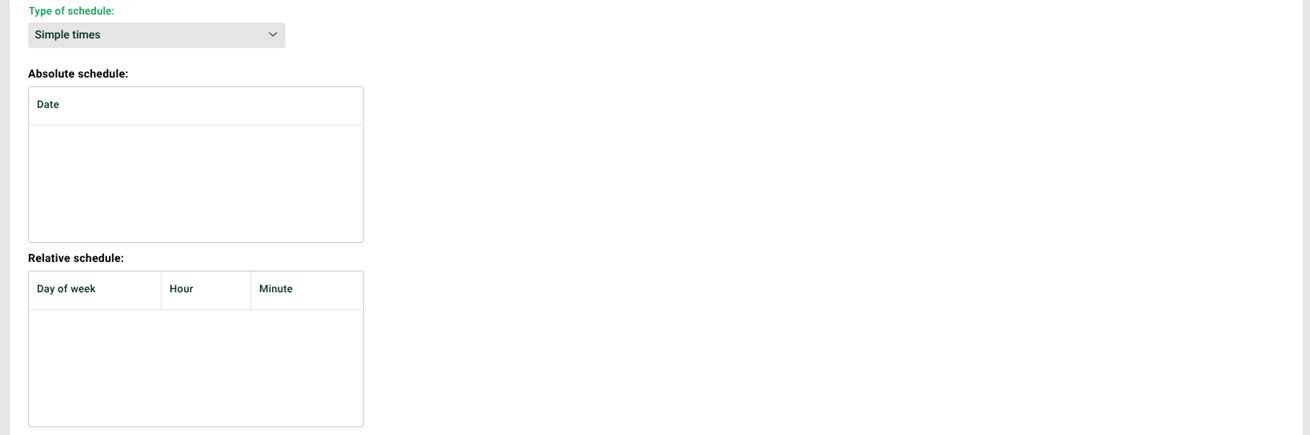
① Absolute schedule: Use the context menu to create absolute entries for "05.01.2026, 08:00", "05.01.2026, 08:30" and "05.01.2026, 11:30".
② Relative schedule: Use the context menu to create relative entries for "Monday, 08:45" and "Monday, 10:45".
Example
The following figure shows an excerpt of the chronological progression for Monday, 05.01.2026.
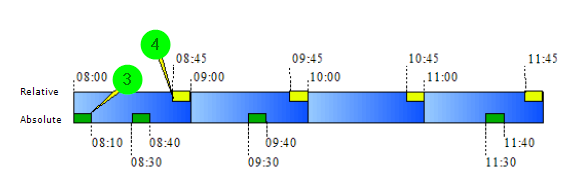
③ A job is started by the absolute scheduling.
④ A job is started by the relative scheduling.
If a job is already running at a start time, the additional start will be skipped. This applies to relative and absolute scheduling. The following figure shows such a case.
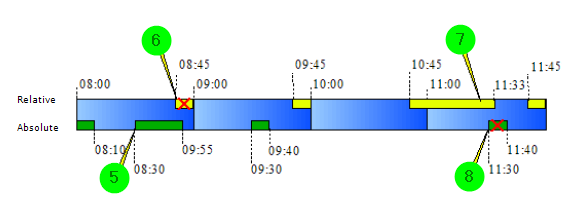
⑤ A job is started by the absolute scheduling.
⑥ Since there is still a job running, no new job is started.
⑦ A job is started by the relative scheduling.
⑧ Since there is still a job running, no new job is started.