Settings
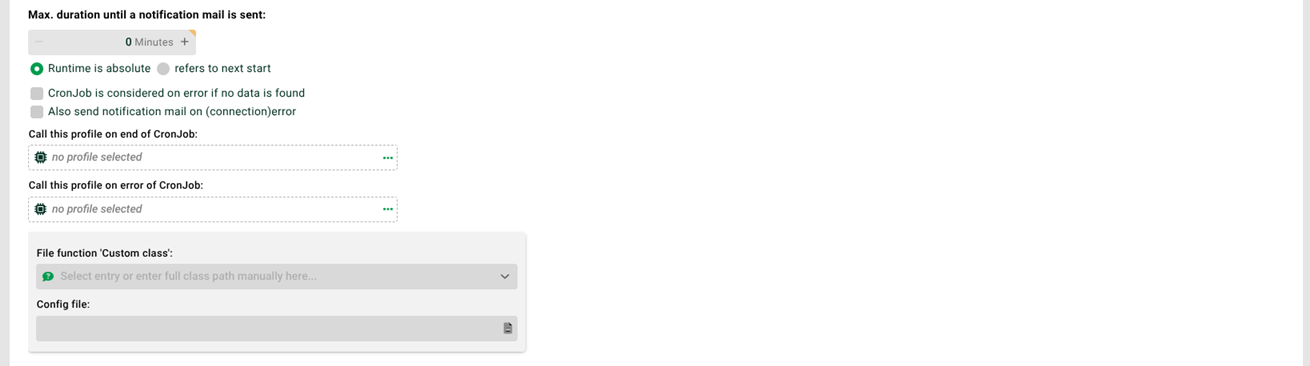
① Max. duration until the system sends a notification mail: To prevent jobs started by the Input agent from running unnoticed for a long time, you can set up an e-mail notification. You configure the SMTP server to use and the sender e-mail address for the error e-mail in the enableErrorMail entry of the configuration file ./etc/startup.xml. If this field has a value greater than 0, the system sends an e-mail if the calculated start time of the next job plus this field's value is earlier than the current time.
② Runtime is absolute, refers to the next start point: If you set an absolute runtime here, ① uses the start time of the current job.
③ Cron job is considered an error if no data is found: If you select this checkbox, the system generates an error when a job starts and no data is available. See Error handling for details.
④ Also send a notification mail on connection error: On a connection error, the system sends an error e-mail. See Error handling for details.
⑤ Call the following profile at the end of the cron job: If the input agent has started at least one job, you can trigger a subsequent (active) profile after the last job. The system also triggers this profile if no job ran successfully.
IMPORTANT: This profile triggers the subsequent profile only once. The triggered profile must have a scheduled input agent (Trigger by other profile); you cannot use profiles with the Message input agent. The subsequent profile cannot access Variables with prefix MSG_CALL_, because the variables in this profile are not yet initialized in Phase 1 – unless another profile also triggers this profile here. In that case, the system can pass through its MSG_CALL_ variables.
NOTE: If you set the option "Activate parallel processing" (see File (cron input agent)), the system calls the selected profile as soon as it has passed the last file to be processed to the system for processing. This means it can no longer guarantee that all data has already been processed before the selected profile starts.
⑥ Call the following cron profile on error of the cron job: If an error occurs while fetching or processing the data, you can specify an (active) profile to call. Example: A profile fetches data from a customer via FTP. If the customer's FTP server is unreachable during the profile run, the system generates an error. You can specify a subsequent profile for this error case to contact an alternative server of the customer.
IMPORTANT: This profile triggers the subsequent profile only once. The triggered profile must have a scheduled input agent (Trigger by other profile); you cannot use profiles with the Message input agent. The subsequent profile cannot access Variables with prefix MSG_CALL_, because the variables in the calling profile are not yet initialized in Phase 1 – unless another profile also triggers this profile here. In that case, the system can pass through its MSG_CALL_ variables.
⑦ File function custom class: For the data sources File, FTP (except via DMZ), SCP, and WebDAV, you can enter File functions here – for example, one that checks whether another file belonging to the source file exists. If the check fails, the system does not create a job.
NOTE: You can access the documentation for a selected class through the question mark icon.
⑧ Timestamp: Timestamp of the profile's last run. Before the first run, the field shows the default value 1.1.1970 01:00. Clicking Request displays the timestamp. The system can set it automatically in the input agents Basic SQL (cron input agent) and HTTP (cron input agent) (see there for details). You can also enter and save the timestamp manually here ⑧.