The input data is read from a database using an SQL query.
If the Input agent starts a Job, it will process all the datasets that the SQL query returns. The result set of the database query is stored in CSV format as a backup file.
Settings
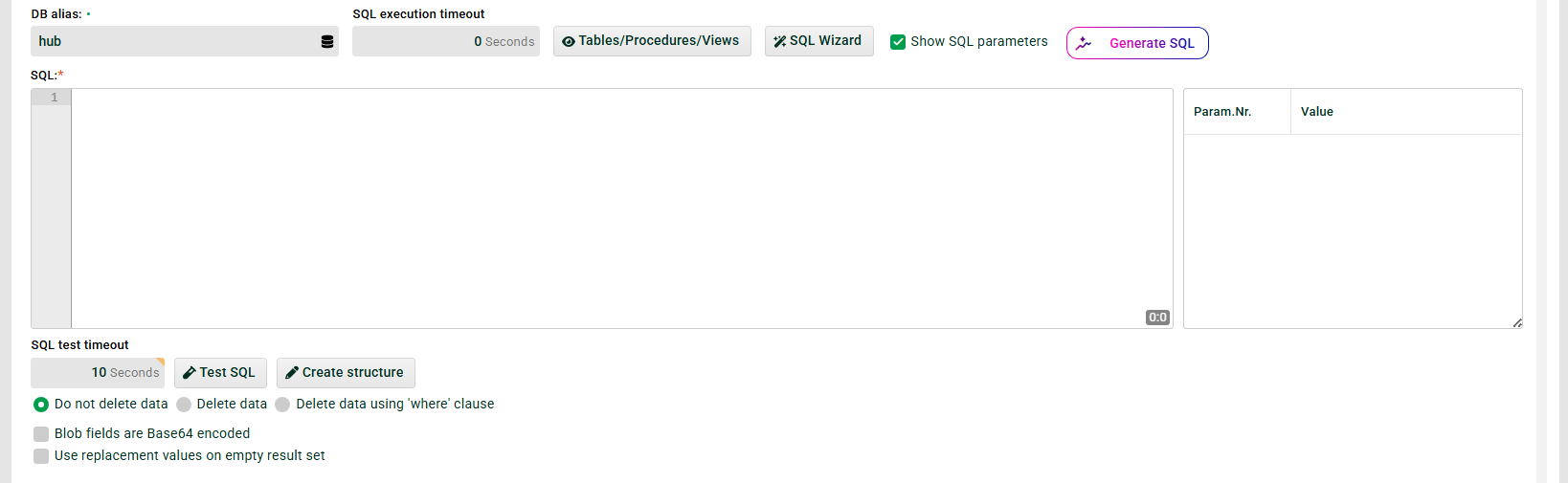
① DB alias: Alias for the connection to the database (selectable via icon on the right). A database alias stands for a configured connection to a database system. See Databases/Connectors.
In addition, all variables with prefix MSG_CALL_ defined in the Profile are available for selection. This makes it possible to pass the alias from a triggering profile or with an HTTP call (see Trigger/External call).
NOTE: For easy testability, the variables should be defined with a default value.
② SQL execution timeout: Timeout for ⑥.
IMPORTANT: Value 0 disables the parameter. That means, if a request runs into a timeout with the driver of the database, there is no response anymore, but the job in the database keeps running after stopping the job run of the profile and might produce a deadlock.
③ Tables/Procedures/Views: Displays all tables and procedures for the selected alias ①.
④ SQL Wizard: A simple wizard that can be used to generate the SELECT statement ⑥.
⑤ Show SQL parameters: To display ⑦.
⑥ SQL: SQL query to read data from the database. Only a single SELECT statement can be specified. Comments can only be specified with /*comment*/, otherwise an error will occur. Queries can be saved and saved queries can be selected via the context menu.
There is another dialog (User menu > Integration Notes > SQL queries) for managing the queries. You can use variables @MSG_CALL_MYVAR@), system constants %MYCONST%, parameters (see ⑦ ) and placeholders for the last profile run timestamp in the query. In addition, permanent profile values (see Options) are allowed %perm:KEYNAME%.
When using variables, it should be noted that only MSG_CALL_ variables make sense here, because only these are initialised in Phase 1. In addition, these variables must also have been created in the profile. A practical application example would be the use of HTTP request parameters (see Trigger/External call) in the SQL query, e.g. @MSG_CALL_PARAM1@. Another possibility is to pass values from preceding profiles in profile chains.
Examples:
SELECT * FROM @MSG_CALL_MYTABLE@
SELECT * FROM %MY_TABLE_CONST%
SELECT * FROM orders WHERE order_no=@MSG_CALL_PARAM1@
SELECT * FROM products WHERE id=@1:s@
SELECT * FROM city WHERE zip=%perm:zip%
There are three placeholders available for the timestamp of the last profile run:
@0:t@: complete timestamp@0:d@: date only@0:s#<template>@: formatted string of the timestamp
Lobster Integration updates the timestamp with every profile run, but only if the query uses the placeholder. The timestamp is updated even if the cron job ran without generating a job. The timestamp remains unchanged only if an error occurs in Phase 1.
Example:
SELECT * FROM orders WHERE act_time > @0:t@
SELECT * FROM orders WHERE act_time > @0:d@
SELECT * FROM orders WHERE act_time > @0:s#yyyyMMdd@
⑦ SQL parameters (right pane): Displayed only if Show SQL parameters ⑤ is enabled. Use the context menu here to define parameters for the WHERE clause of the query.
The following are allowed as parameter values:
Fixed values
Variables:
@MYVAR@System constants:
%MYCONST%Permanent profile values:
%perm:KEYNAME%
The placeholders for these parameters have the syntax @<parameter number>:<data type>@, for example @1:s@. The following data types are allowed:
Abbreviation | Data type |
|---|---|
| Integer |
| Float |
| Real |
| Date |
| Timestamp |
| String |
| Long |
| Boolean |
| Blob |
| Textstream |
Similarly, only variables prefixed with MSG_CALL_ are valid as parameter values. The same conditions apply as for the SQL field ⑥.
Example:
Param nr:
1.Value:
@MSG_CALL_PARAM1@.
⑧ SQL test timeout: Timeout for ⑨.
⑨ Test SQL: Executes the SQL statement from the SQL field ⑥ as a test. If the statement contains a * for the column names, Lobster Integration reads the actual column names from the response. Lobster Integration enters these names into the SQL field ⑥.
⑩ Create structure: The columns of the SQL statement are created as fields below a new node in the source structure. Existing Mapping instructions are retained. The data types and field lengths of the columns are taken from the database definition.
⑪ Delete data: Causes all read data of the table to be deleted. If isolation level "Read Committed" is set, data can simultaneously be inserted by another program.
CAUTION: This checkbox should only be used with extreme caution. If the number of deleted lines is different from the number of lines read, no job is started and an error is generated.
You can optimize the delete operation using a WHERE clause. Lobster Integration uses the WHERE clause from the SQL field ⑥ with the same parameters. This is especially important when the data types do not match exactly.
⑫ Blob fields are Base64 encoded: If this checkbox is set, the content of BLOB data fields (binary data) will be encoded with Base64 before passing to the profile.
NOTE: Otherwise, binary data may cause an error when the Source tree is created. Read-in fields can be decoded with the function decode Base64().
⑬ Use replacement values on empty result set: If this option is selected, data will be supplied to the profile even if the SQL query does not generate a result set. The specified replacement values will then be transferred to the profile. The data must be in CSV format (delimiter character comma).
⑭ Generate SQL: See section "Pathfinder" below.
Pathfinder
Generate SQL
You can use natural language here to get an AI-generated SQL query.
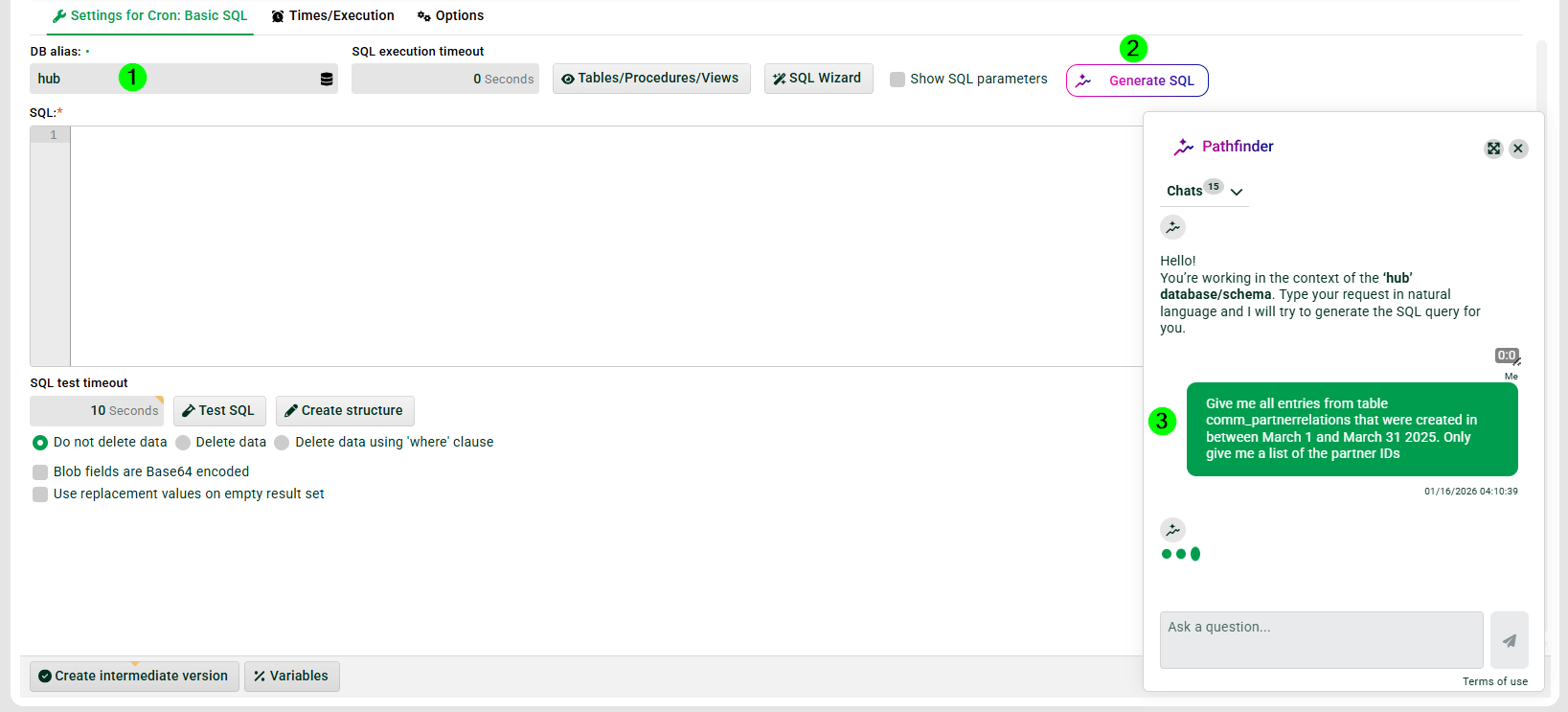
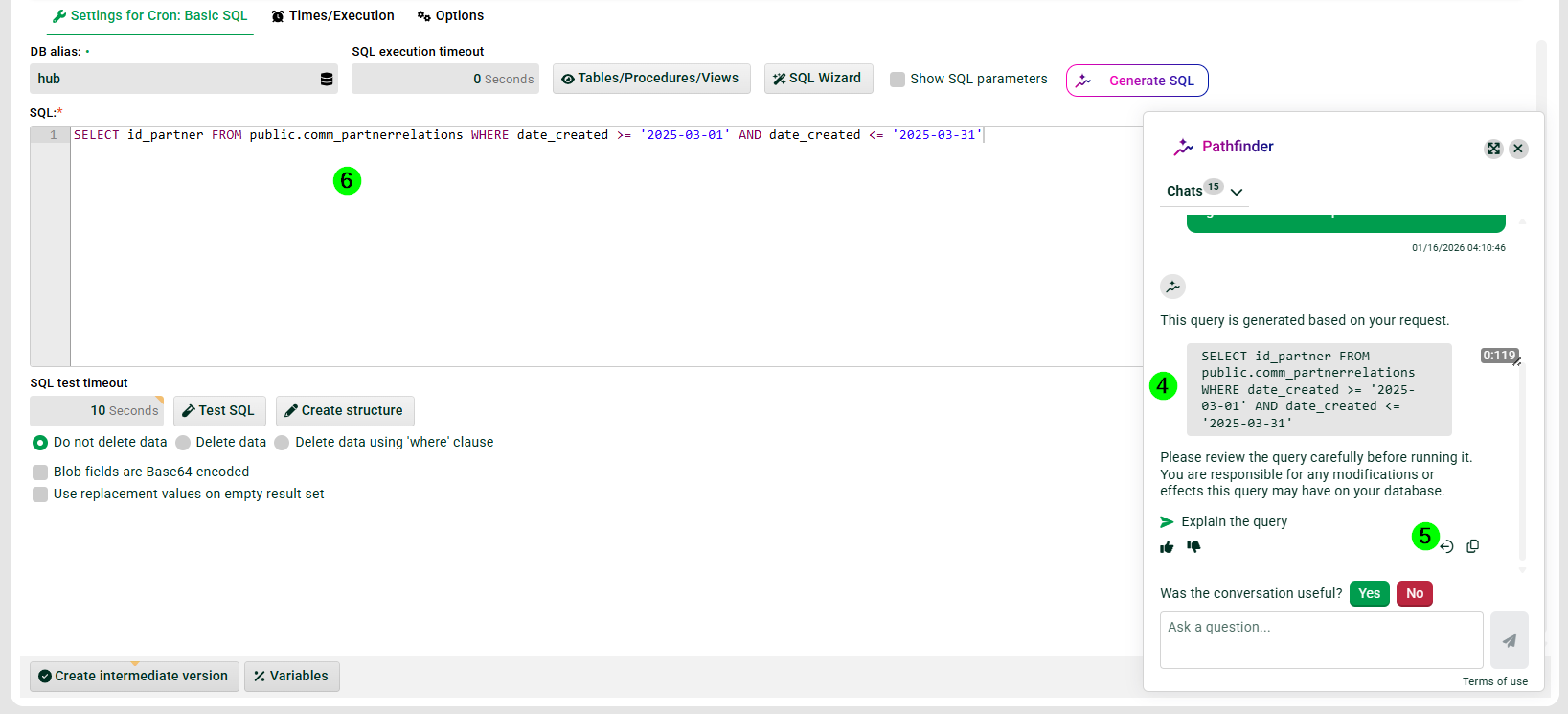
① The database for which Pathfinder generates the query.
② Generate SQL: Opens the input field for the natural-language description.
③ Description of the desired query in natural language.
④ Result of the generated query.
⑤ Transfers the generated SQL query to the query field ⑥.
⑥ The transferred generated SQL query.
IMPORTANT: The generated SQL query may contain errors. Review the query before using it.
Blanks in query result (MSSQL/Informix)
In MSSQL and Informix databases, the result values of SQL calls are trimmed of preceding and following spaces by default. The skipTrimResultValues parameter can be used in the database alias configuration file (DatabaseService) to change this behavior.