Click path
Integration > Profile > Phase 6 > New response > AS/400> [AS/400] Settings
Settings
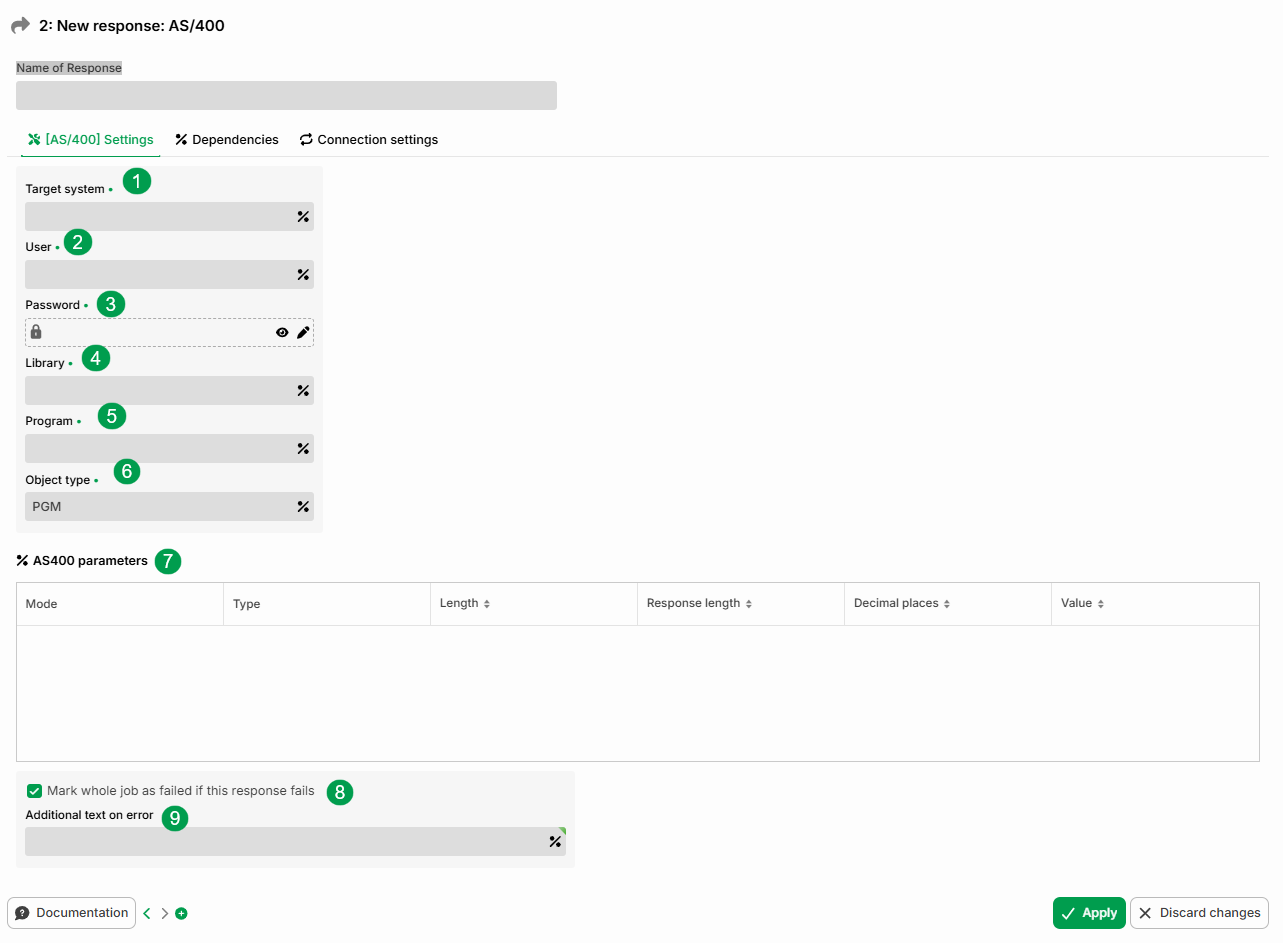
① Target system: DNS name or IP address of the target computer. NOTE: Use the prefix secure: for TLS-based AS400 connections.
② User: A user to authenticate on the target computer.
③ Password: Password to authenticate on the target computer.
④ Library: Name of the program library..
⑤ Program: Name of the called program.
⑥ Object type: The object type should be "PGM"..
⑦ AS400 parameters: A new entry can be created using the context menu. Possible modes are “Input,” “Output,” and “Input/Output.”
NOTE: The parameters are used solely to ensure the call is executed correctly; no values from output parameters are returned in the response. The following figure shows the parameter settings.
Mode | Type | Length | Response length | Decimal places | Value |
|---|---|---|---|---|---|
Output | Text | 9 | 9 | 2 | some_value |
⑧ Mark whole job as failed if this response fails: Normally a job is not necessarily considered to be erroneous if a single response fails (see Dependencies). This option allows you to enforce that behavior.
⑨ Additional text on error: Here you can specify an additional log text for the error case..
Retries
Retries for this response are controlled via the Connection settings tab; the general behavior is described there. The following also applies to the AS/400 response:
Every attempt opens a new connection (connection establishment, login, program call).
A rejected login attempt and a program that returns AS/400 messages will not be retried.
If the connection is lost after the RPG/CL program has run, the program can be executed again when the process is repeated.
The Permitted execution time field represents the total timeout across all attempts. An existing value set for a single call may cause the repetitions to be terminated after the first failed attempt.