The Response AMQP allows you to publish messages to a broker. Currently, only AMQP 1.0 is supported.
Navigation path
Integration > Profiles > Phase 6 > New response > AMQP > [AMQP] Settings
Settings
This section describes the fields of the AMQP response.
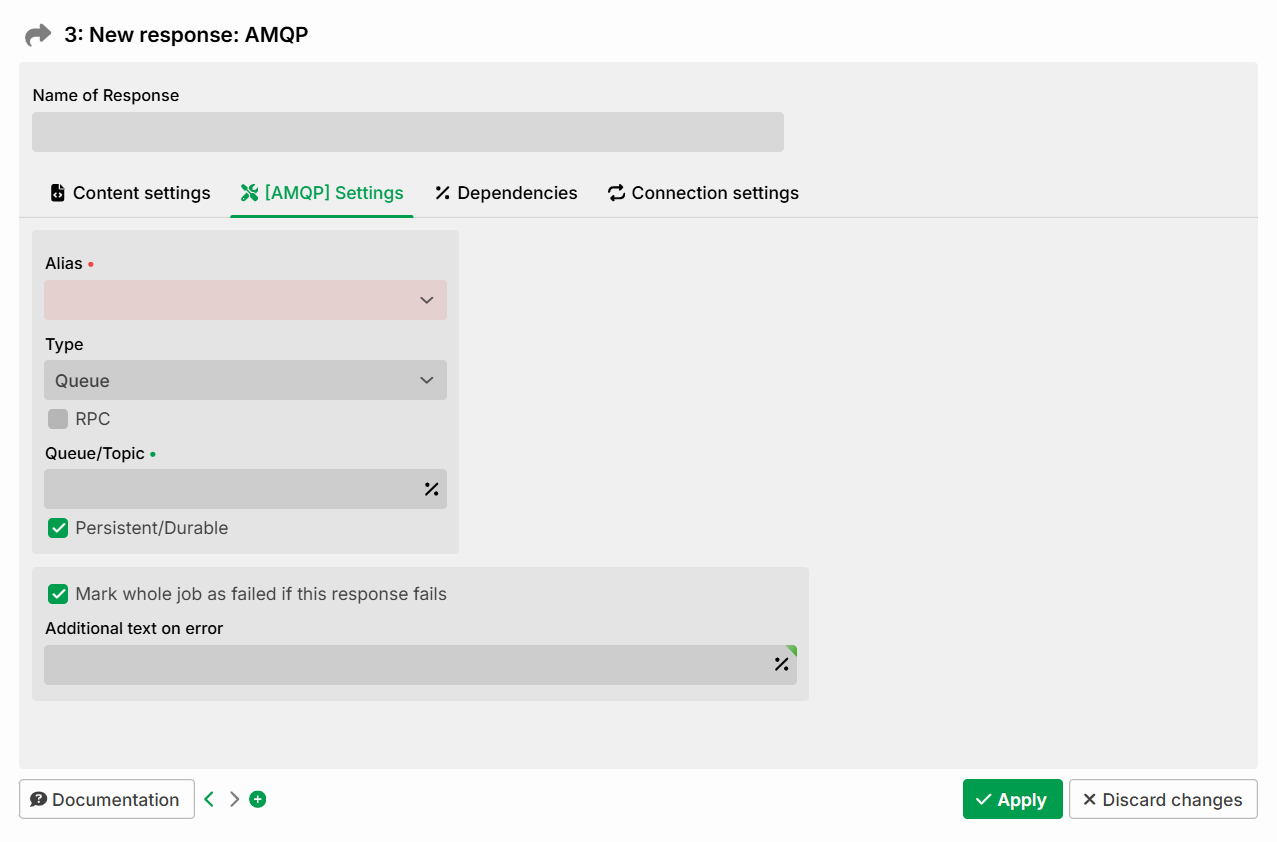
Setting | Description |
|---|---|
Alias | Selection of an AMQP 1.0 alias (see AMQP 1.0 connections). Required field. |
Type | Defines whether a Queue or a Topic is used as the destination. |
RPC | If the checkbox is checked, the call is made synchronously (Request/Response). Otherwise, it is sent asynchronously. When RPC is enabled, additional fields appear (see section Settings when RPC is enabled). |
Queue/Topic | Name of the queue or topic to which the message is sent. Required field. Some brokers require an additional prefix, e.g., |
Persistent/Durable | Marks the message as "durable"; the broker then stores it permanently if possible. Whether the message is actually persisted depends on the broker and its settings. Does not apply to RPC. |
Mark whole job as failed if this response fails | Normally, a job is not necessarily considered failed if a single response path fails (see section Error behavior). This option enforces that the entire job is considered failed if this response path fails. |
Additional text on error | Optional, additional log text for the error case. |
Settings when RPC is enabled
When RPC is enabled, a Following profile is required. The Following profile receives the response generated by the RPC call.
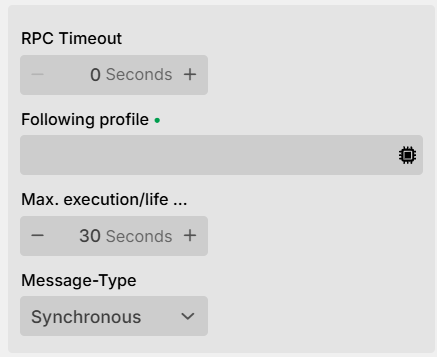
Setting | Description |
|---|---|
RPC Timeout | Specifies (in seconds) how long the sending profile waits for the RPC response message provided by the AMQP broker on the temporary reply queue. If this timer expires, the RPC call itself is considered failed. Example of an error message: "Got no response from AMQP 1.0 RPC call within 20000ms". |
Following profile | The specified profile must be active and have an input agent of type Message. |
Max. execution/life | Specifies the maximum total time (in seconds) for executing the response, including sending, processing, and any retry attempts. The specific behavior depends on the message type (see Message types). The minimum lifetime of the message is 12 hours (regardless of the configured value). With the retry mechanism, this value also controls the retry behavior from the connection settings (permitted execution time across all retry attempts). |
Message-Type | Type of message. Possible values: Synchronous, Asynchronous, Persistent (see section Message types). |
Message types
A message can have three different types.
Message type | Behavior |
|---|---|
Synchronous | The profile sends the message and does not continue until the response has been received. It waits until the target profile has finished its processing (successfully or with an error). If the time set under Max. execution/life is exceeded, the response aborts with an error, even though the target profile might succeed later. |
Asynchronous | The profile sends the message and continues immediately; the response is irrelevant for further profile execution. The profile does not wait for the target profile; instead, the response ends successfully after the data has been transferred. The time set under Max. execution/life is the maximum lifetime of the message; if it could not be received by the target profile within this time, it is deleted. |
Persistent | Works similarly to Asynchronous. In addition, if the destination is unavailable, the message is stored, and an attempt is made to send it every 50 ms. If no success is achieved within the time set under Max. execution/life, the message is lost. |
AMQP Message Properties
For outgoing connections, certain properties of a message can be set via variables.
Application Properties
Every AMQP 1.0 message can carry any number of user-defined key-value properties. You set these via AMQP_APPLICATION_PROPERTY_<key>. Here, the <key> part is property's key (case-sensitive), while the variable's value corresponds to the property's value. In the legacy implementation, these were referred to as "headers".
Example:
AMQP_APPLICATION_PROPERTY_<key>with the value2345creates a property named<key>with the value2345.
Fixed Properties
AMQP 1.0 messages also have predefined properties, which you set via AMQP_FIXED_PROPERTY_*.
The complete list of configurable properties and the associated variables can be found under System variables.
Body type
The Body Type is set via the variable AMQP_FIXED_PROPERTY_BODY_TYPE with the values value, data or sequence (default, if not set: value).
Message ID and Correlation ID
If Message ID and Correlation ID are not set, both are automatically generated as UUID values. If the variable AMQP_SYS_MESSAGE_CORRELATION_ID_FORMAT is not set or contains a value other than string, long or binary, this default UUID format also applies. The specified format is used instead only for one of these three values. If only the type is set, without specifying a Message ID or Correlation ID via a variable, the respective ID is automatically generated in the corresponding type.