Navigation path
Integration > Profile > Phase 6 > New response > AMQP/JMS > [AMQP/JMS] Settings
Settings
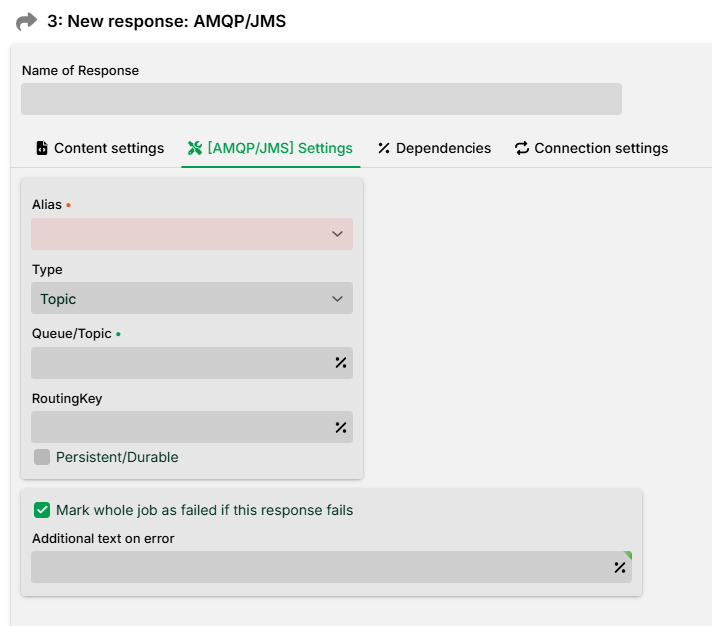
Setting | Description |
|---|---|
Alias | Selection of an AMQP alias. |
Type | Selection of the type (Publish, Routing, Topic, or RPC). RPC is synchronous; all others are asynchronous. |
Queue/Topic | Name of the queue to send to, or name of the topic. See, e.g., RabbitMQ. |
RoutingKey | The routing key is a message attribute that the server uses to decide how the message should be routed to queues. For details, see the documentation of the AMQP server used (e.g., RabbitMQ). Does not apply to Publish. |
Persistent/Durable | Marks the specified queue as "durable" (such a queue survives a broker restart). Does not apply to RPC. |
Mark whole job as failed if this response fails | Normally, a job is not necessarily considered failed if a single response fails (see section Error behavior). This option enforces that the whole job is considered failed when this response fails. |
Additional text on error | Optional additional log text for the error case. |
Settings for type: RPC
For type RPC, a Following profile is required. The following profile receives the response generated by the RPC call.
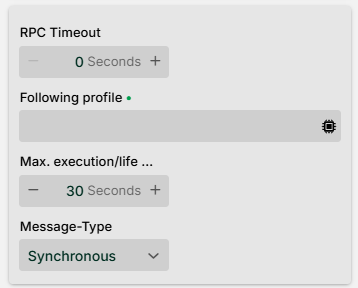
Setting | Description |
|---|---|
RPC Timeout | Specifies (in seconds) how long the sending profile waits for the RPC response message that the AMQP broker provides on the temporary reply queue. If this timer expires, the RPC call itself is considered failed. Example error message: "Got no response from AMQP 1.0 rpc call within 20000ms". |
Following profile | The specified profile must be active and have an input agent of type Message. |
Max. execution/life | Specifies the maximum total time (in seconds) for the execution of the response, including sending, processing, and any retries. The specific behavior depends on the message type (see Message types). The minimum lifetime of the message is 12 hours (regardless of the value set). Together with the retry mechanism, this value also controls the retry behavior from the connection settings (permitted execution time across all retries). |
Message type | Type of the message. Possible values: Synchronous, Asynchronous, Persistent (see Message types). |
Message types
A message can have three different types.
Message type | Behaviour |
|---|---|
Synchronous | The profile sends the message and only continues once the response has been received. It waits until the target profile has finished its processing (successfully or with an error). If the time set under Max. execution/life is exceeded, the response terminates with an error, even though the target profile may eventually finish successfully. |
Asynchronous | The profile sends the message and continues immediately; the response is irrelevant for the further profile execution. The profile does not wait for the target profile; instead, the response ends successfully after the data has been transferred. The time set under Max. execution/life is the maximum lifetime of the message; if it could not be accepted by the target profile within this time, it is deleted. |
Persistent | Works analogously to Asynchronous. As an extension, however, if the remote system is unavailable, the message is stored, and an attempt is made to send it every 50 ms. If no success could be achieved within the time set under Max. execution/life, the message is lost. |
AMQP message properties
To set a message property, a System variables of the form AMQP_<name of the message property> must be defined in the profile (upper and lower case in the property is considered).
Example
With the variable
AMQP_TTLyou can set the message property TTL.
AMQP 0.9.1 specifics
If you are using AMQP 0.9.1, only certain message properties can be set with the following system variables.
AMQP_091BASIC_CONTENT_TYPEAMQP_091BASIC_CONTENT_ENCODINGAMQP_091BASIC_MESSAGE_IDAMQP_091BASIC_TIMESTAMPAMQP_091BASIC_EXPIRATIONAMQP_091BASIC_APP_IDAMQP_091BASIC_USER_IDAMQP_091BASIC_TYPEAMQP_091BASIC_PRIORITYAMQP_091BASIC_CORRELATION_ID
AMQP 1.0 specifics
For the Message Properties MessageId and CorrelationId, the default is:
If no value is assigned to
CorrelationIdvia the variableAMQP_SYS_CorrelationId, an automatically generatedUUIDis assigned.If no value is assigned to
MessageIdvia the variableAMQP_SYS_MessageId, a randomStringis assigned.
Starting with LDP Release 26.2.0, you can override this default behavior if necessary by assigning a value (see table “Values for AMQP_SYS_MESSAGE_CORRELATION_ID_FORMAT“.) to a custom profile variable AMQP_SYS_MESSAGE_CORRELATION_ID_FORMAT.
IMPORTANT:
Requirements for using non-standard logic for
CorrelationIdandMessageId
Since variables can only be defined in the context of Phase 3 (Mapping), Mapping may need to be enabled for this purpose.
The variable
AMQP_SYS_MESSAGE_CORRELATION_ID_FORMATmust be explicitly defined in the profile (type:String).The variable
AMQP_SYS_MESSAGE_CORRELATION_ID_FORMATmust be assigned one of the values listed below when executing the Response.
Values for AMQP_SYS_MESSAGE_CORRELATION_ID_FORMAT
Assignment ( | Effect on | Effect on |
|---|---|---|
| Output as Default value: A string representation of an automatically generated | Output as Default value: random |
| Output as Default value: Hash value ( | Output as Default value: random |
| Output as Byte Array Default value: Byte Array of the string representation of an automatically generated | Output as Byte-Array Default value: random |
Standard | Output as Default value: automatically generated | Output as Default value: random |
Note
The default behaviour, which is consistent with previous versions, applies if the variable does not exist, no value has been assigned, or a value not listed here has been assigned.
You can set further message properties via the following system variables:
AMQP_SYS_GroupIdAMQP_SYS_ContentTypeAMQP_SYS_Subject
Body Type
The body type of the AMQP/JMS Response is defined via the system variable AMQP_SYS_BodyType (type: String). Allowed values: data, sequence, value. Default value: value.
AMQP 1.0 Message Headers
If you are using AMQP 1.0, you can set message headers with system variables of the form AMQP_<name of the header> (upper and lower case in the header is considered).