Messages are used to transfer data to another Profile or to communicate with other Integration Servers.
Calling a profile in a Response passes not only the input data but also the variables to the subsequent profile. The values of the passed variables can be accessed in the subsequent profile.
Click path
Integration > Profile > Phase 6 > New response > Message > [Message] Settings
Settings
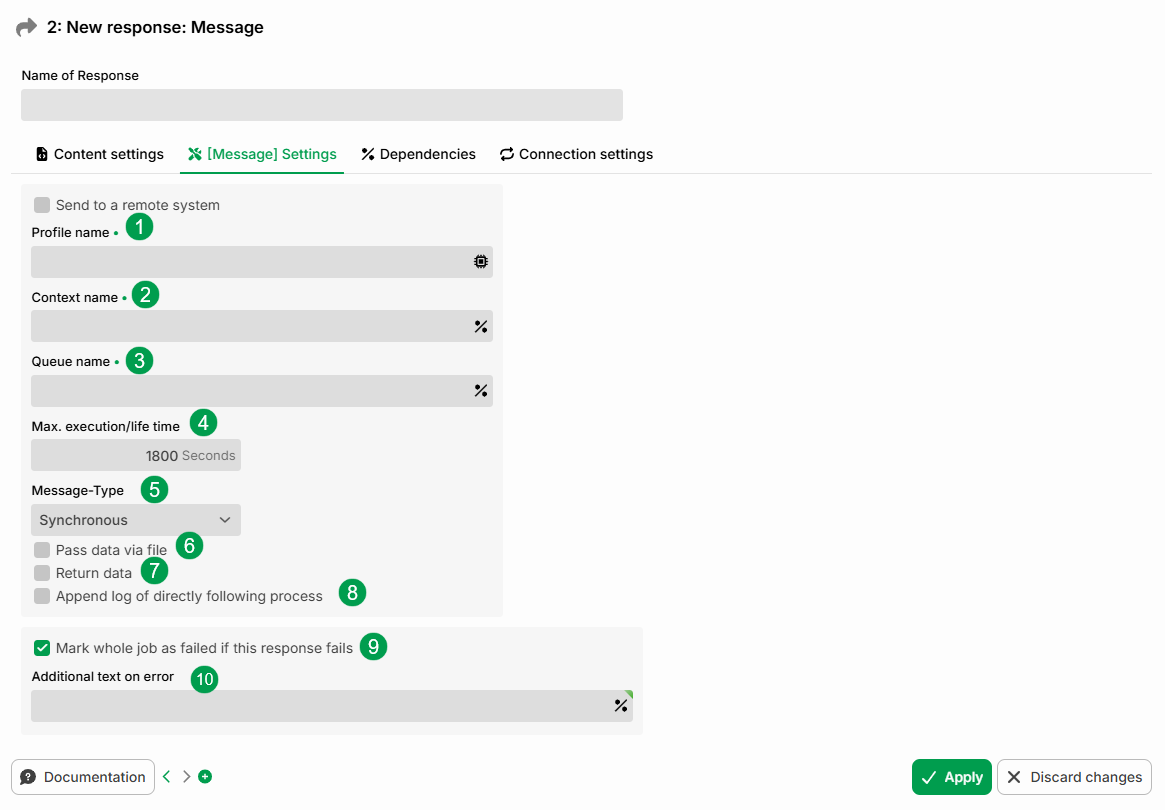
① Profile name: Specifies which profile should be targeted. Please note that profiles with a scheduled incoming agent can only be displayed in the selection if the "Trigger profile" option was previously selected in the Content settings under "Content" (see the note regarding changed values for context and queue under Trigger/External call).
② Context name and ③ Queue name together form a unique key. The values can be freely assigned. As a convention, a generic term such as System or Cluster is specified in the Context. This generic term groups similar queues. Both the Context and Queue can be specified with variables. This makes it possible to route messages to different queues depending on the data.
④ Max. execution/life time: Specifies the maximum time, in seconds, that a message may take to be sent and processed.
With a synchronous message, the profile waits until the target profile has finished processing (successfully or with errors). If the time set here is exceeded, this response terminates with an error, although the target profile may eventually finish successfully.
In the case of an asynchronous or persistent message, the profile does not wait for the target profile, but the response ends successfully after the data has been transferred. The message itself has a finite lifetime. If it could not be accepted by the target profile after this time, it will be deleted. The time set here is the maximum lifetime of the message. NOTE: The minimum lifetime is 12 hours (regardless of the set value).
⑤ Message type: There are three different types of messages.
Synchronous. The profile sends the message and does not continue until the response has been received.
Asynchronous. The profile sends the message and continues immediately. The response is irrelevant for the further profile execution.
Persistent. Works almost like Asynchronous. Additionally, however, if the remote system cannot be reached, the message will be stored and resend every 50 ms. If the message could not be delivered after a maximum time ④, it is lost.
⑥ Pass data via file: The data is not passed directly to the subsequent profile via the Message Queue. Instead, the data is stored in a file. This file will then be read by the subsequent profile. This procedure is particularly appropriate for considerable amounts of data.
⑦ Return data: If the profile has an Input agent of the "HTTP" type and ⑤ is set to Synchronous, the response (the first converted result of the subsequent profile that has been triggered by this response) including the HTTP headers can be returned to the external Client that had sent the request to the profile. See Profile chains for details.
⑧ Append log of directly following process: With this option, the logs of the called profile can be attached to this job.
⑨ Mark whole job as failed if this response fails: Normally, a job is not necessarily considered failed if a single response fails (see Dependencies). However, this option can be used to force that behavior here.
⑩ Additional text on error: You can enter additional log text here in case of an error.
Retries
Retries for this response are controlled via the Connection settings tab; the general behavior is described there. The following also applies to the "Message" response:
Only synchronous messages are retried, and only in the event of transport errors (consumer not found, remote node unreachable, executor unavailable). Responses beginning with "ERROR:", timeouts, and consumer exceptions are not retried, since the destination has already received the message in these cases.
For remote or load-balanced targets, the target profile may still be executed twice: A read timeout is reported as "unreachable" and is therefore retried. The Max. execution/life time field should be set to a value higher than the expected runtime of the target profile.