Settings
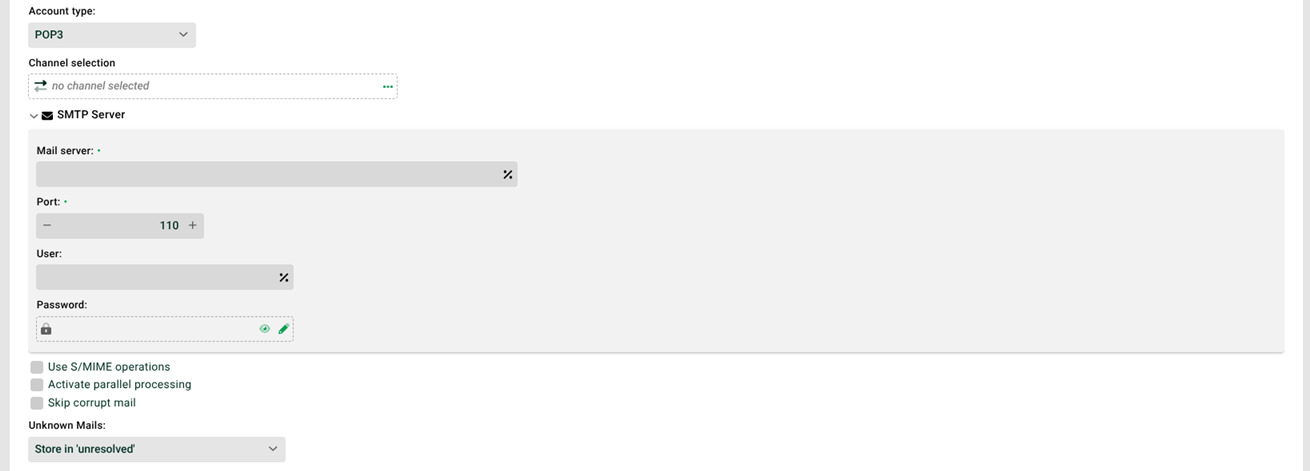
① Channel selection: Channel of the Mail type that connects to the server to retrieve the e-mails (fetching channel). For POP3S (port 995), you must select a channel.
② Mail server: URL/IP address and port of the mail server, plus user and password. If these fields are empty, the system uses the values from the configuration file ./etc/startup.xml. This also applies to user and password. Values entered in these fields are then ignored. If a channel is selected and the port is 0, the port from the channel applies. For a port greater than 0, that value applies.
③ Use S/MIME operations: If the checkbox is set, the system decrypts received S/MIME e-mails. Otherwise, the e-mails remain as received. See the corresponding settings in Mail (Channels).
④ Activate parallel processing: If this checkbox is set, several instances of the Processing profile (see Distribution rules (mail)) can work in parallel. The checkbox "Profile may only run in one instance" (see General (Main settings)) must not be set for this profile. For details, see Parallel processing of mails.
⑤ Skip corrupt mail: If the checkbox is set, the system continues receiving after a corrupt e-mail. Otherwise, the job terminates.
⑥ Unknown mails: If the system finds no matching processing profile for an e-mail (see the following section), it moves the e-mail to the “Unresolved” area or discards it. See also Non-assignable e-mails.
Distribution rules
See Distribution rules (mail). If no rule is specified or no rule applies, the setting in ⑥ applies.
System variables
Several system variables are available for received e-mails. VAR_SYS_MAIL_HEADER_<name of the email header in capital letters> deserves special mention.
Example: The variable VAR_SYS_MAIL_HEADER_DATE receives the original string value of the e-mail header Date. The e-mail header line Date: Wed, 6 Sep 2017 13:50:01 +0300 results in the variable content Wed, 6 Sep 2017 13:50:01 +0300.
See also VAR_SYS_ATTACHMENT_NAME.
NOTE: The system variable VAR_SYS_MAIL_HEADER_RECEIVED contains only the first "Received" mail header. To get all of them, use VAR_SYS_MAIL_HEADER_RECEIVED_ALLB64. This variable contains all received mail headers, comma-separated and encoded in Base64.