IMPORTANT: The UAFI program provided by X.400 providers is not supported.
Settings
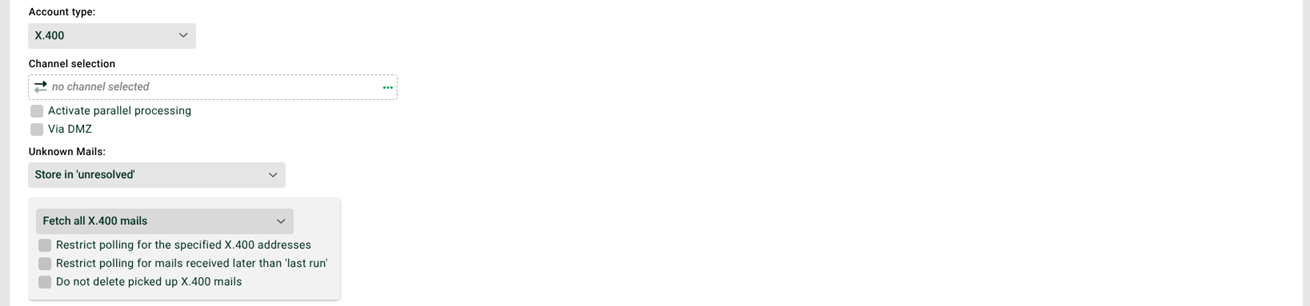
Enable parallel processing: Enable this checkbox to let multiple instances of the Processing profile (see Distribution rules (mail)) run in parallel. In that case, don't enable the "Profile may only run in one instance" (see General (Main settings)) checkbox for this profile. For details on this processing, see the Parallel processing of mails.
Channel selection: The channel of type
X.400that you must use for the connection to the server to retrieve the e-mails (retrieval channel).Via DMZ: If you use a DMZ server, the transfer happens through it when you enable this option. If you don't configure a DMZ, the system doesn't show this checkbox.
NOTE: For extremely large files, a timeout can occur in the communication between the Integration Server and the DMZ server. The "Dealing with timeouts due to extremely large files" section in FTP/FTPS/SFTP (cron input agent) describes a solution.
CAUTION: This setting can cause performance losses. Avoid it if possible.
Unknown mails: If the system doesn't find a matching processing profile for an e-mail (see the following section), it moves the e-mail to the
Unresolvedarea or discards it. See also Non-assignable e-mails.Retrieve all X.400 mails: This option determines whether the system always retrieves all messages on every job, or only the ones not read yet.
Further restrict retrieval to the specified X.400 addresses: The box only retrieves messages that come from the channel selected under "Channel selection". Alternatively, a comparison channel from the distribution rules applies.
Further restrict retrieval to mails newer than the last run: The system only retrieves e-mails that have arrived since the last run of the profile (see Options).
Don't delete retrieved X.400 mail: The system doesn't remove the files from the server after retrieval.
Distribution rules
See Distribution rules (mail) for details. If no rule is specified or no rule applies, the setting under unknown mails applies.
System variables
The system fills the system variable VAR_SYS_MAIL_BODY with the body text and passes it to every job that processes data from the message (attachment or body).
See also VAR_SYS_ATTACHMENT_NAME and VAR_SYS_MAIL_ATTACHMENTS (number of attachments).
The system variable VAR_SYS_MTS_ID contains the MTS identifier of X.400 messages.
NOTE:
If you use the system variable
VAR_SYS_MAIL_HEADER_RECEIVED, it only contains the firstReceivedmail header. UseVAR_SYS_MAIL_HEADER_RECEIVED_ALLB64to get all of them. This variable then contains all received mail headers, comma-separated and Base64-encoded.