Numerous templates are already available for source and target structures. These are ready-made structures that you can load directly into a Profile without having to first create them from external sample files or systems.
Standard templates provided
The following table shows the current number of default templates per Document type.
Format | Number of templates | Details |
|---|---|---|
BWA | 4 | - |
CSV | 2 | - |
Cargo-IMP | 77 | IATA standard format for air freight. |
EDIFACT | 9137 | All EDIFACT documents from 1995 onward. |
Fixed length | 20 | FORTRAS/VDA templates. |
IDoc/RFC | 2845 each (source and target structure) | From system releases 46C, 700, and 750. Only for fixed-length IDocs; XML IDocs are treated as normal XML files. NOTE: Templates can also be read online from an SAP system. See also Loading SAP templates. |
X12 | 921 | ANSI standard, primarily used in North America. |
XML | 10 | Two version levels (ZUGFeRD 2.3.2/Factur-X 1.07.2 and ZUGFeRD 2.5/Factur-X 1.09), each with the profiles MINIMUM, BASIC, BASIC WL, EN16931, and EXTENDED. |
Client-specific custom templates
You can also customize the templates listed above and save them under a new name; the new template will then be assigned to your tenant. Completely new templates can also be created in the same way.
For example, source structures are often similar when target data for many different Partners must be created from an in-house format. In this case, you create the source structure for the in-house format once and save it as a template. You can then load the template as often as needed, adjust it if necessary, and use it in the profile. The same applies to frequently used target structures.
When you save a template under your own name, it is automatically assigned to your client and will only be available within that client going forward.
NOTE: When exporting target structures, the configured functions and variables are also exported.
Navigation path
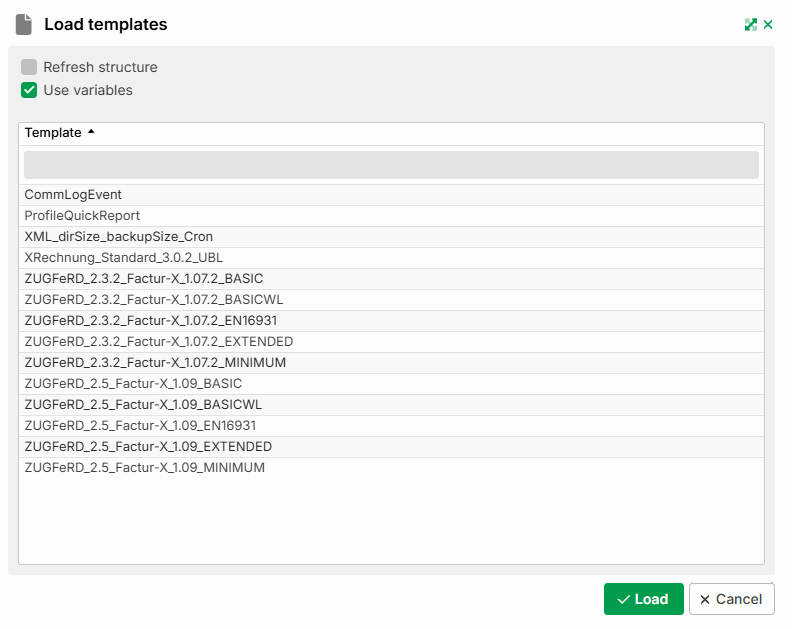
Integration > Profile > Phase 3 > Target structure > Menu > Load template
.png)
Settings
Setting | Description |
|---|---|
Refresh structure | If this checkbox is enabled when clicking Load, the structure is updated. This is useful when, in an existing Mapping, the structure should not be replaced but only updated, for example because a new custom segment has been added. For a target structure, the system attempts to preserve function chains and formats if the new structure differs only slightly from the previous one. See also Update the template without losing mappings. |
Use variables | Applies only to target structure templates: If this option is enabled when clicking Load, the system automatically creates the variables required for the structure with the appropriate data type in the profile, if they do not already exist. It also automatically assigns the appropriate functions and values to the corresponding target structure fields. |
Load | Applies the selected structure. |