The top menu bar provides the following functions in the mapping.
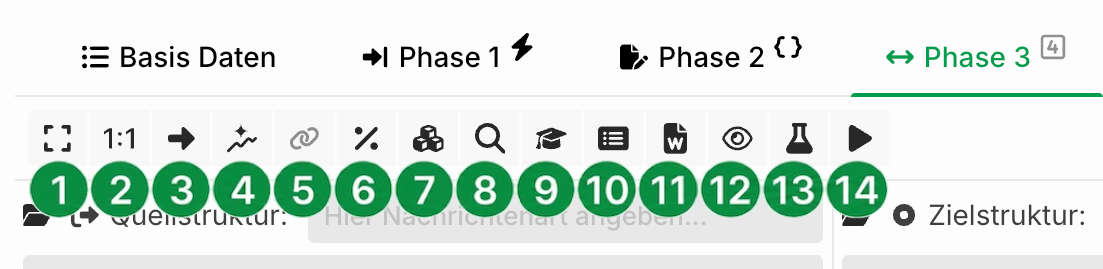
① Full-page mapping view.
② Builds the source and target structure 1:1 and assigns them to each other. See also Mapping – Filling a record of the target tree and 1:1 mapping.
③ Selected fields or one node of the source structure are created in the target structure and assigned accordingly.
④ Opens the dialog in which you can perform the Pathfinder auto-mapping. See also Pathfinder Auto-Mapping.
⑤ Assigns the selected fields of the source and target structure to each other in order. If exactly one node is selected in each structure, the path is set instead.
⑥ Opens a dialog where you define variables and constants. See also profile variables and system variables.
⑦ Opens the management of your macros.
⑧ Opens the Search and find dialog. There you see all mappings between source and target fields. Various search functions are available.
⑨ Opens an element list for X12 and EDIFACT. The list shows all available elements (fields) and their meaning. For each element, all allowed values and their meaning are listed. If you have selected a target structure field, the window shows the meaning and the allowed values for that field. Double-click to transfer a value as a fixed value to the selected field in the target structure.
⑩ Opens a compact view of the configured mapping. Use the context menu to export the mapping settings (mappings, functions) as an XML file. Import the file again the same way. This is useful when you want to replace structures with modified ones and restore the original mapping. All nodes and fields involved in the mapping must exist in the new structures for the import to work.
⑪ Generates documentation for selected nodes and fields of the source and target structure in a Word-like format. Copy the generated content into your external documentation. The Description attribute of nodes and fields is also included. Store the general description of a profile in the Info (basic data) section.
⑫ Shows or hides the source and target structure.
⑬ Opens the mapping test. There you can check your mapping settings automatically and trigger a restart.
⑭ Start profile: Restarts the profile manually.