This Input agent retrieves files from a cloud storage. You configure the connection to the provider in a Channel of the Cloud Storage type.
Settings
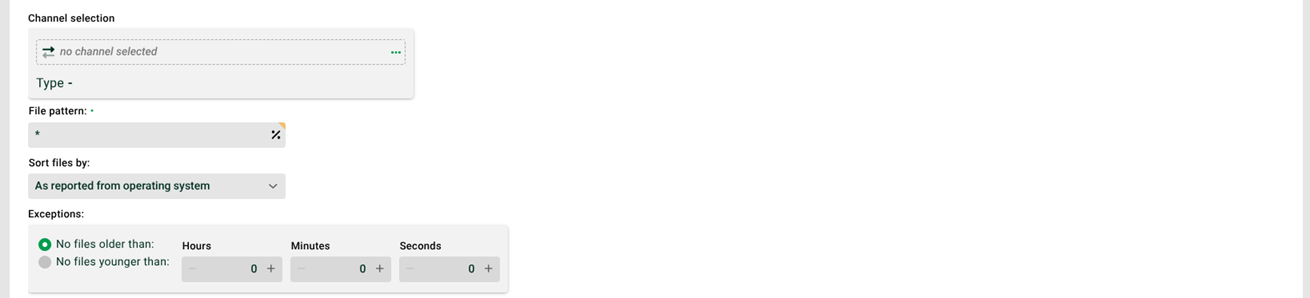

① Channel selection: Select a channel of the Cloud Storage type. You specify the provider-specific settings in this channel.
② File pattern: File name pattern. You can enter multiple file name patterns, separated by the pipe character (|). Example: *.txt|*.csv.
③ Sort files by: You sort the files for processing by file name or timestamp, either in ascending or descending order. Alternatively, the system uses the order supplied by the operating system.
NOTE: When sorting by timestamp, the accuracy is in the minute range under Windows and in the second range under Unix and Linux.
④ Exceptions: The fields No files older than and No files younger than define which files the profile uses. For the values 0/0, the system does not check. This option is only useful if the profile does not delete files. Example: The profile searches for new files every 30 minutes. If you set 0 hours and 30 minutes, the profile ignores all files from the previous run on the next run. Their timestamp is older than the time of the run minus 30 minutes.
⑤ Directory: The directory in which the profile searches for files.
NOTE: Within the file pattern and the directory, the system resolves all timestamp placeholders of the form <yyyy>, <dd>, and so on. Variables are allowed. In Phase 1, however, only Variables with prefix MSG_CALL_ are available.
⑥ Activate parallel processing: If this checkbox is set, several instances of this profile can work in parallel. The checkbox "Profile may only run in one instance" (see General (Main settings)) must not be set for this profile.
⑦ Via DMZ: If this checkbox is set, the system receives the data via the DMZ server.
NOTE: If no DMZ server is configured, the system does not display this checkbox.