IMPORTANT: The AS4Service requires a license and is disabled by default. Contact Lobster support or sales to have it licensed and activated.
Supported scope
The platform’s AS4 implementation covers a specific subset of OASIS ebMS3/AS4. It is built on the Holodeck B2B engine and supports a single message exchange pattern.
Supported
OASIS ebMS3/AS4 one-way push (sending and receiving) between the Lobster Data Platform and a partner AS4 gateway.
Synchronous receipts only (the receipt is returned in the HTTP response).
Signing and encryption with RSA certificates, using the algorithms listed in the channel (SHA-256/384/512 with RSA; AES-128/192/256 in CBC and GCM mode).
WS-Security username token via API or import (not in the UI).
AS4 payload compression.
One payload per message.
Fixed collaboration values: Service "DataTransfer" (type
org:holodeckb2b:services), Action "StoreMessage", no AgreementRef, and a party ID without atypeattribute. From Lobster Data Platform version 26.3.2, the AS4Service configuration can generate inbound P-Modes without the Service/Action restriction (so any Service/Action is accepted) and preserve the generated P-Mode files (underetc/as4/repository/pmodes) across restarts, so manual adjustments to partner-specific values persist.
Not supported
Pull message exchange pattern, two-way MEP, asynchronous receipts, reception-awareness retries, duplicate elimination, non-repudiation receipts, multiple payloads, and message properties.
Elliptic-curve key agreement (ECDH-ES); Brainpool or EC certificates for message encryption.
Domain profiles: BDEW energy market (Marktkommunikation), EU eDelivery/CEF (EUDAMED, ICS2, eFTI), ENTSOG, and Peppol. Peppol is served by the separate Lobster Peppol access point, not by the Lobster Data Platform AS4 channel.
Certificate chain or revocation validation of partner certificates (partner certificates are trusted directly).
TLS termination for the AS4 listener: Holodeck listens on plain HTTP (default port 8080). HTTPS must be provided by a reverse proxy or by the Lobster Data Platform listener in front of it.
Prerequisites
The URL of the partner AS4 service must be entered as a partner address in an AS4 channel if outgoing data is allowed. The protocol can be HTTP or HTTPS because the AS4 protocol is transported within an HTTP envelope.
For incoming data, the AS4 channel is selected in an AS4 Input agent, which receives the data at the inbound endpoint. See AS4 (Input agent).
Navigation path
Administration > Partners > Partners/Channels > [create a new channel] > AS4
Settings
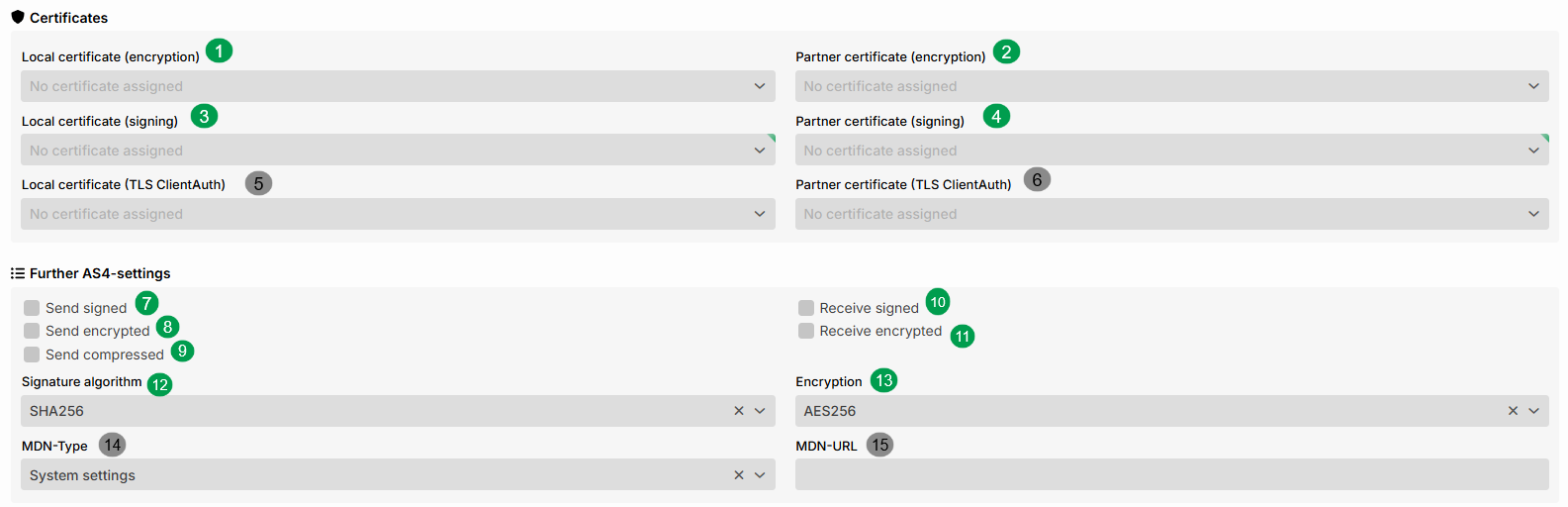
Certificates
① Local certificate (encryption): A local certificate (with private key) can be assigned to the channel here. This certificate is used to decrypt the incoming data encrypted by the partner. If no local certificate has been assigned under ③, it also serves to sign outgoing data. NOTE: The external server is allowed to use a Self-signed certificate for HTTPS. The import of the server certificate as a Partner Certificate is not required. See also Certificates.
② Partner certificate (encryption): A partner certificate, i.e., the public part of a certificate of your partner, can be assigned to the channel here. This certificate is used to encrypt the data to be sent. If no partner certificate has been assigned under ④, it also serves to check the signature of received data.
③ Local certificate (signing): see ①.
④ Partner certificate (signing): See ②.
NOTE:
Local certificate (TLS ClientAuth) (⑤) and Partner certificate (TLS ClientAuth) (⑥) are not applicable to AS4 and have no function. The fields are stored but not used by the AS4 engine.
⑦ Send signed: Specifies whether data sent to the partner system is signed. The data is signed with the signature algorithm set in (⑫ ).
⑧ Send encrypted: Specifies whether data sent to the partner system is encrypted. The data is encrypted with the encryption algorithm set in (⑬ ).
⑨ Send compressed: Specifies whether data sent to the partner system is compressed.
⑩ Receive signed: If set, data that is not signed is rejected.
⑪ Receive encrypted: If set, data that is not encrypted is rejected.
CAUTION: If the partner sends encrypted or signed data, a local certificate to decrypt the data or a partner certificate to check the signing must still be available, even if the options here in (⑩ ) and (⑪ ) are not set. Otherwise, the message would not be decryptable or the signature could not be checked. But the message will not be rejected.
⑫ Signature algorithm: Determines which algorithm is used to sign the sent data. The setting is only effective if the checkbox Send signed (⑦) is set.
⑬ Encryption: Determines which algorithm is used to encrypt the sent data. The setting is only effective if the checkbox Send encrypted (⑧) is set.
NOTE:
MDN-Type (⑭) and MDN-URL (⑮) are not applicable to AS4 and have no function.