Introduction
The AS4 Input agent receives incoming AS4 messages that a partner pushes to the inbound endpoint.
URL: http://server.example.com:8080/holodeckb2b/as4
IMPORTANT: The AS4Service requires a license and is disabled by default. It must be activated before you can use this Input agent. Contact Lobster support or sales.
The sender and receiver of the incoming data are checked against those defined in the profile (channel). In addition, one of the attachment file names must match the file pattern defined in the profile. If several active profiles match, profile scoring decides which one runs.
The AS4 channels used here are configured in partner management. See AS4 channel.
Supported scope
The platform’s AS4 implementation covers a specific subset of OASIS ebMS3/AS4. It is built on the Holodeck B2B engine and supports a single message exchange pattern.
Supported
OASIS ebMS3/AS4 one-way push (sending and receiving) between the Lobster Data Platform and a partner AS4 gateway.
Synchronous receipts only (the receipt is returned in the HTTP response).
Signing and encryption with RSA certificates, using the algorithms listed in the channel (SHA-256/384/512 with RSA; AES-128/192/256 in CBC and GCM mode).
WS-Security username token via API or import (not in the UI).
AS4 payload compression.
One payload per message.
Fixed collaboration values: Service "DataTransfer" (type
org:holodeckb2b:services), Action "StoreMessage", no AgreementRef, and a party ID without atypeattribute. From Lobster Data Platform version 26.3.2, the AS4Service configuration can generate inbound P-Modes without the Service/Action restriction (so any Service/Action is accepted) and preserve the generated P-Mode files (underetc/as4/repository/pmodes) across restarts, so manual adjustments to partner-specific values persist.
Not supported
Pull message exchange pattern, two-way MEP, asynchronous receipts, reception-awareness retries, duplicate elimination, non-repudiation receipts, multiple payloads, and message properties.
Elliptic-curve key agreement (ECDH-ES); Brainpool or EC certificates for message encryption.
Domain profiles: BDEW energy market (Marktkommunikation), EU eDelivery/CEF (EUDAMED, ICS2, eFTI), ENTSOG, and Peppol. Peppol is served by the separate Lobster Peppol access point, not by the Lobster Data Platform AS4 channel.
Certificate chain or revocation validation of partner certificates (partner certificates are trusted directly).
TLS termination for the AS4 listener: Holodeck listens on plain HTTP (default port 8080). HTTPS must be provided by a reverse proxy or by the Lobster Data Platform listener in front of it.
Settings
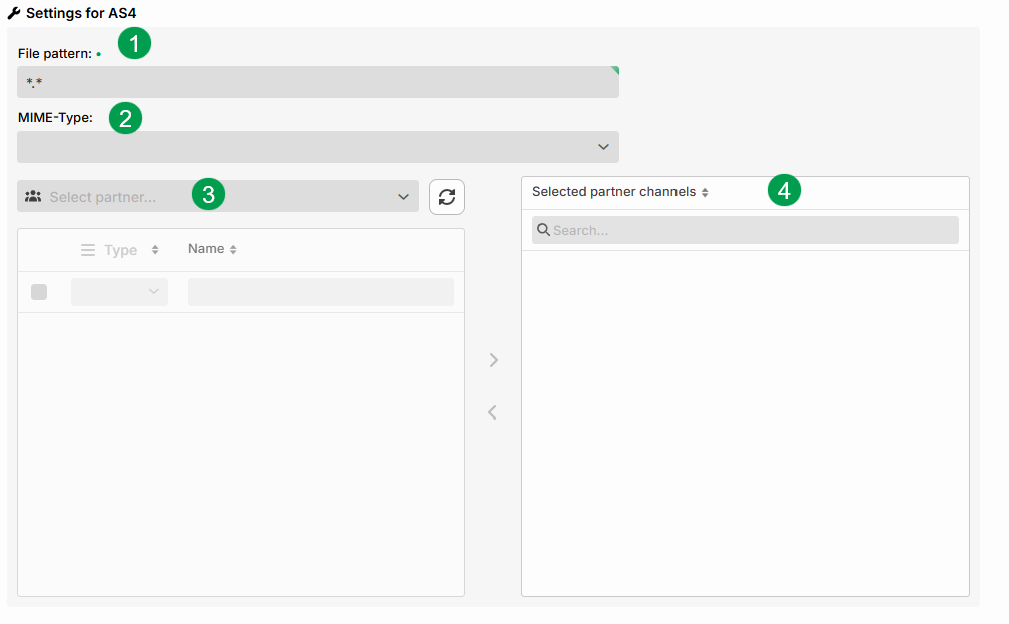
① File pattern: File pattern for the file name of the attachment. See File names, file patterns, paths, placeholders. To enter multiple file patterns, separate them with the pipe character “|”, for example *.txt|*.csv.
② MIME type: You can restrict the data to a specific MIME type.
③ Partner selection (left): Select a partner and then move any of the partner’s channels to the right. Only active AS4 channels with the data direction “Incoming” are offered.
④ Selected partner channels: AS4 channels selected for the profile. At least one must be selected.
System variables
The subject is available in the profile via the system variable VAR_MAILSUBJECT.
See also
Maximum size of input files and messages: This Input agent can check the maximum size of input files.
Data that cannot be assigned to any profile is moved to the “Unresolved” area. See Warning for non-assignable input data.