With this plugin, you can run JSONPath queries on JSON files. You can either enter the JSONPath expression required for the query yourself or have it generated by Pathfinder.
Navigation path
Plugins > Check JsonPath
Settings
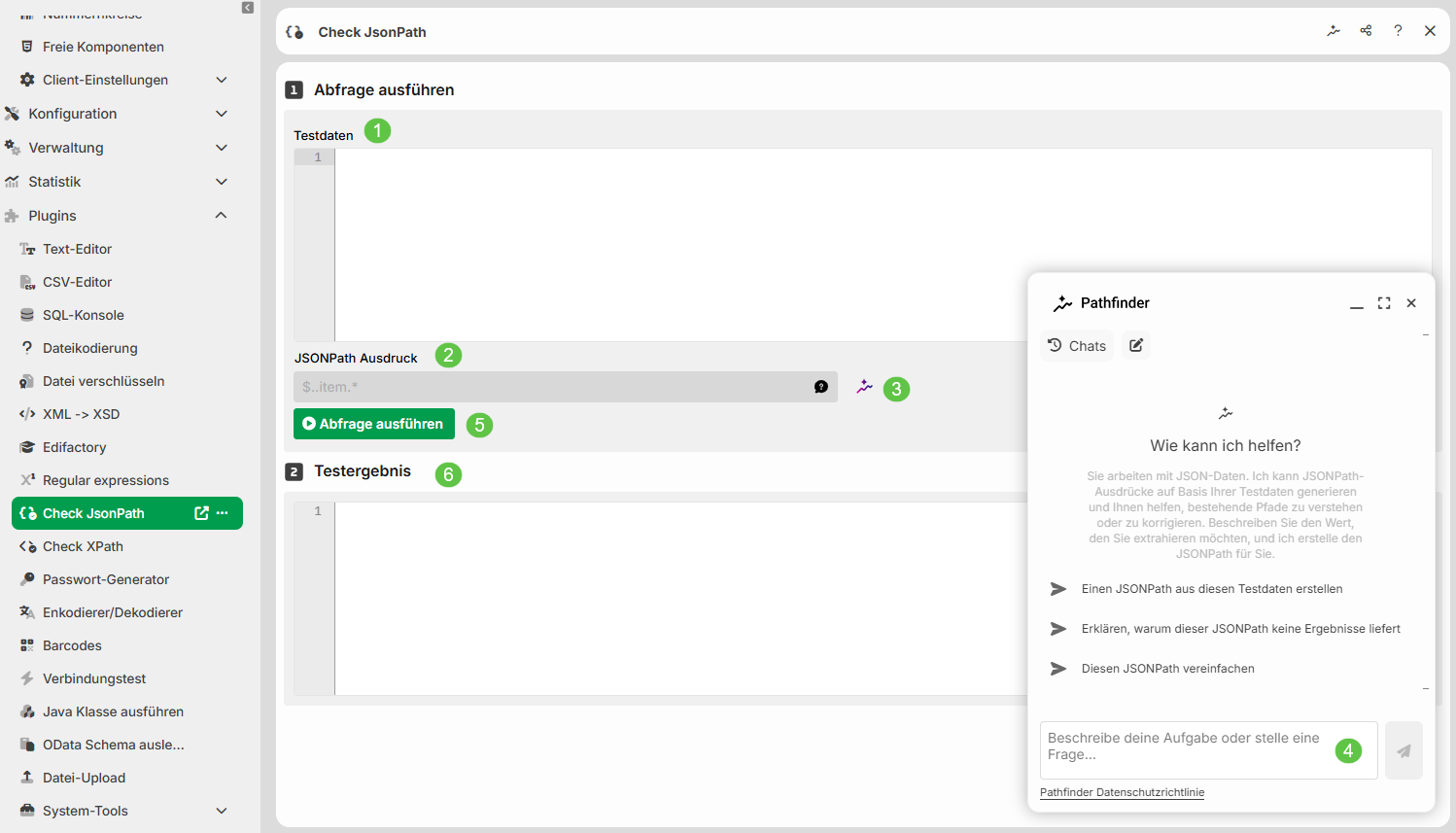
① Test data: The data to which the JSONPath expression ② is applied. NOTE: The test data must not exceed 1 MB. If the data comes from a file, the limit applies to the file size.
② JSONPath expression: The JSONPath expression that is applied to ①. NOTE: This article does not cover the JSONPath syntax in detail. You can find numerous examples on the internet.
③ Generate JSONPath: Opens the Pathfinder chat window ④.
④ Pathfinder chat window: Here you describe which value you want to extract from the test data ①. Pathfinder then generates a matching JSONPath expression.
⑤ Execute query: Executes the query and writes the result to the Test result ⑥.
⑥ Test result: The result of the query.
Example files
Order
{
  "order": {
    "orderNumber": "4500098231",
    "orderDate": "2026-08-12",
    "currency": "EUR",
    "buyer": {
      "name": "Muster Handels GmbH",
      "gln": "4399901234567",
      "address": {
        "street": "Industriestrasse 12",
        "postalCode": "82178",
        "city": "Puchheim",
        "country": "DE"
      }
    },
    "deliveryAddress": {
      "name": "Zentrallager Nord",
      "gln": "4399901234598",
      "address": {
        "street": "Hafenstrasse 88",
        "postalCode": "20457",
        "city": "Hamburg",
        "country": "DE"
      }
    },
    "items": [
      {
        "position": 10,
        "gtin": "04012345678901",
        "description": "Cable reel 25 m",
        "quantity": 120,
        "unit": "PCE",
        "unitPrice": 34.90,
        "requestedDeliveryDate": "2026-08-20"
      },
      {
        "position": 20,
        "gtin": "04012345678918",
        "description": "Grounding-type plug",
        "quantity": 40,
        "unit": "PCE",
        "unitPrice": 4.25,
        "requestedDeliveryDate": "2026-08-20"
      },
      {
        "position": 30,
        "gtin": "04012345678925",
        "description": "Extension cable 5 m",
        "quantity": 500,
        "unit": "PCE",
        "unitPrice": 12.50,
        "requestedDeliveryDate": "2026-09-01"
      }
    ],
    "totalNetAmount": 11035.00
  }
}
Delivery
{
  "messageHeader": {
    "messageId": "MSG-2026-08-18-0007",
    "createdAt": "2026-08-18T07:42:11Z",
    "sender": { "id": "LOBSTER_DEMO", "idType": "GLN" },
    "receiver": { "id": "4399901234567", "idType": "GLN" }
  },
  "shipments": [
    {
      "shipmentId": "SHP-100045",
      "status": "IN_TRANSIT",
      "carrier": {
        "scac": "DHLE",
        "name": "DHL Freight",
        "trackingNumber": "00340434161094015398"
      },
      "route": {
        "origin": { "location": { "gln": "4399901234598", "city": "Hamburg", "country": "DE" } },
        "destination": { "location": { "gln": "5412345000013", "city": "Rotterdam", "country": "NL" } }
      },
      "customs-declaration": { "required": true, "reference": "MRN26DE1234567890" },
      "packages": [
        {
          "sscc": "003404341610940153",
          "grossWeightKg": 18.4,
          "dimensionsCm": { "length": 60, "width": 40, "height": 30 },
          "contents": [
            {
              "position": 10,
              "gtin": "04012345678901",
              "quantity": 24,
              "batch": { "number": "L-2026-0871", "bestBefore": null }
            },
            {
              "position": 20,
              "gtin": "04012345678918",
              "quantity": "12",
              "batch": null
            }
          ]
        },
        {
          "sscc": "003404341610940160",
          "grossWeightKg": 7.9,
          "dimensionsCm": { "length": 40, "width": 30, "height": 20 },
          "contents": [
            {
              "position": 30,
              "gtin": "04012345678925",
              "quantity": 100,
              "batch": { "number": "L-2026-0902", "bestBefore": "2027-06-30" }
            }
          ]
        }
      ]
    },
    {
      "shipmentId": "SHP-100046",
      "status": "PLANNED",
      "carrier": {
        "scac": "DBSH",
        "name": "DB Schenker"
      },
      "route": {
        "origin": { "location": { "gln": "4399901234598", "city": "Hamburg", "country": "DE" } },
        "destination": { "location": { "gln": "3012345000015", "city": "Lyon", "country": "FR" } }
      },
      "customs-declaration": { "required": false, "reference": null },
      "packages": [
        {
          "sscc": "003404341610940177",
          "grossWeightKg": 42.0,
          "dimensionsCm": { "length": 120, "width": 80, "height": 95 },
          "contents": [
            {
              "position": 10,
              "gtin": "04012345678932",
              "quantity": 480,
              "batch": { "number": "L-2026-0915", "bestBefore": "2028-01-31" }
            }
          ]
        }
      ]
    }
  ]
}
Generate JSONPath expression with Pathfinder
Insert your JSON data into the Test data field.
Click on Generate JSONPath. The Pathfinder chat window opens.
In the input field, describe which value you want to extract. Example:
Extract all positions.Pathfinder generates a JSONPath expression and explains how it works.
Click on
 below the expression. The expression then appears in the XPath expression field. The expression then appears in the JSONPath expression field.
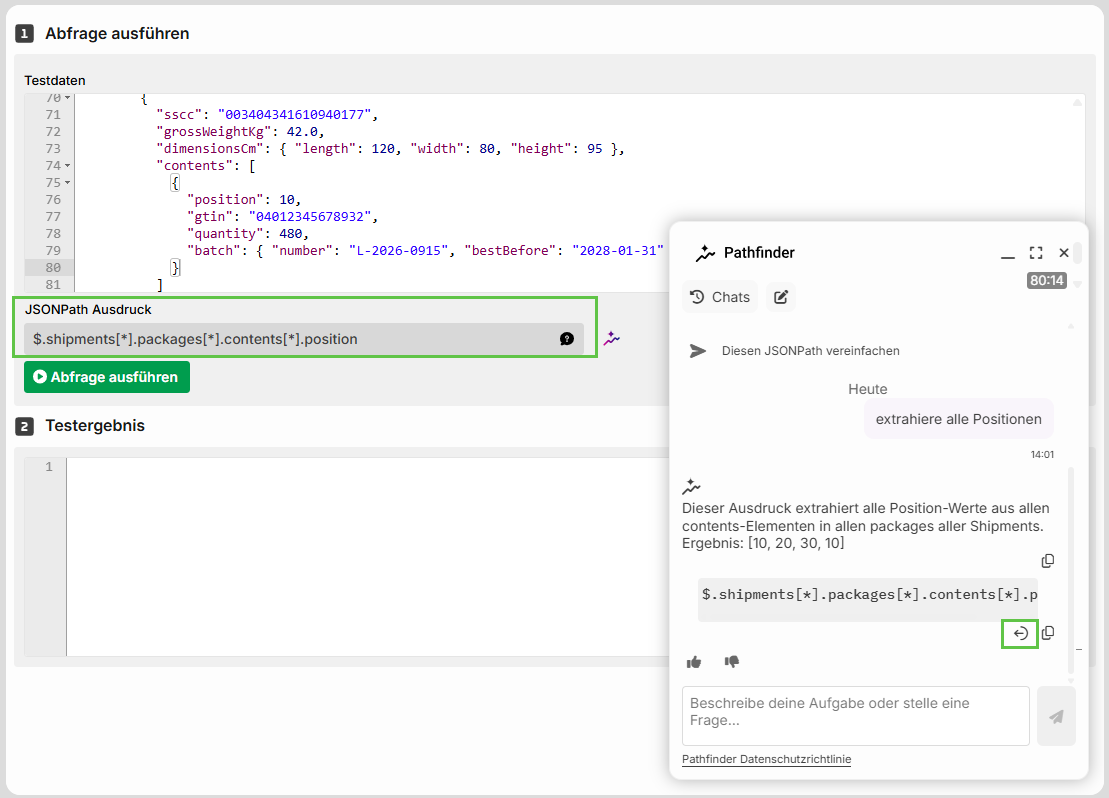
Click Execute query. The result appears under Test result.
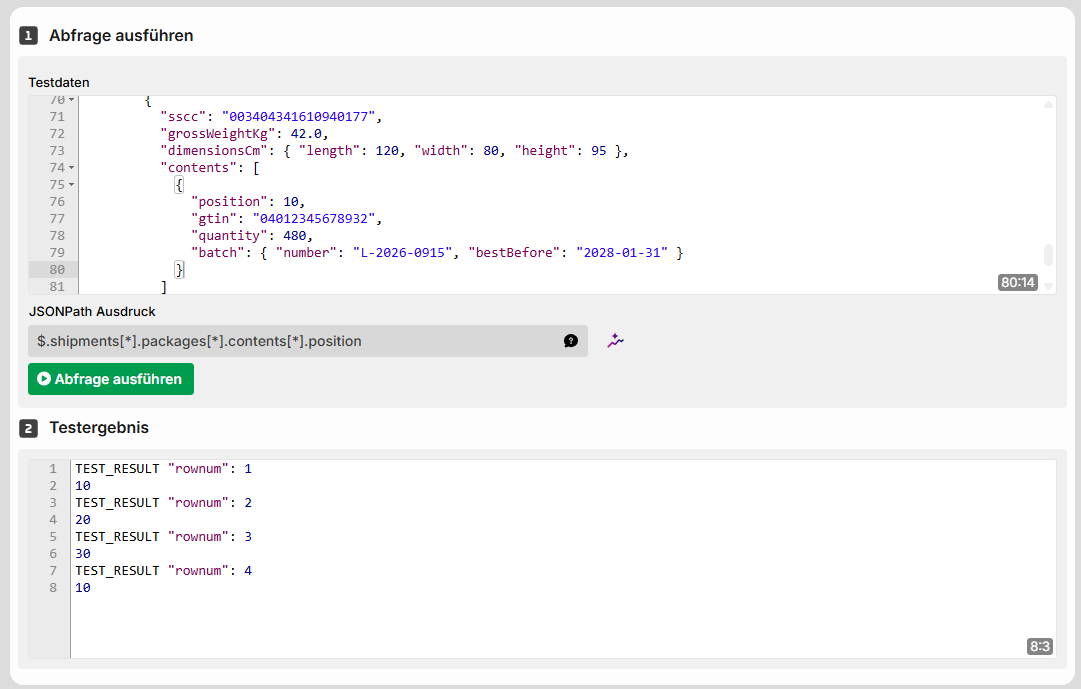
TIP
If the test result is empty, describe to Pathfinder in the chat window which result you expected. Pathfinder will then check the expression against your test data.