Lobster Integration contacts an FTP server and scans a directory for files that match the File pattern. The Profile scans only the specified directory, no subdirectories. It processes the files in the order in which the FTP server delivers them.
Settings
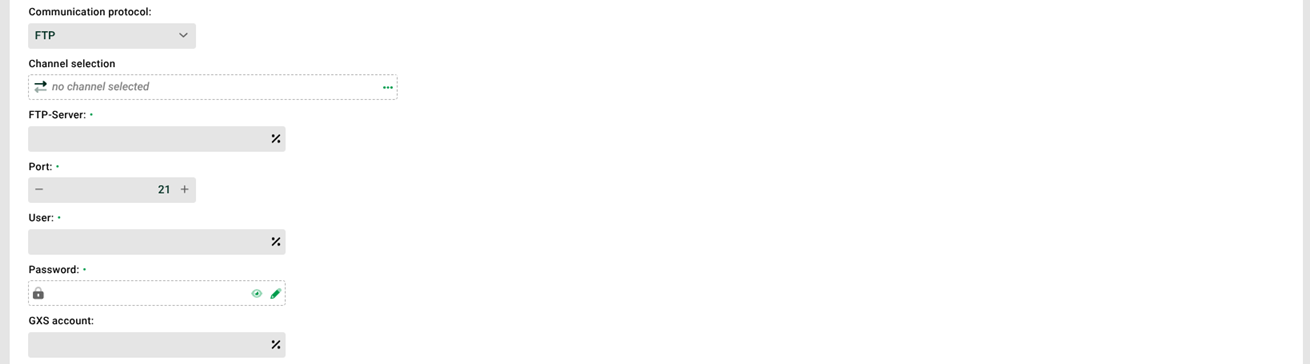
① Communication protocol: Choose between the protocols FTP, SFTP, and FTPS. See also ③.
② Via DMZ: If this checkbox is set, the system receives the data via the DMZ server. It contacts the DMZ machine. The DMZ machine executes the FTP commands, receives the files, and stores them locally. The system then fetches these files via an internal system communication partner using FTP and processes them. This option is only available if a channel is configured in ③. If no DMZ server is configured, the system does not display this checkbox.
CAUTION: The system creates the internal communication partner DMZ Internal automatically. Do not change it.
③ Channel selection: Select a channel of type FTP (for the protocols FTP and FTPS) or SSH (for the protocol SFTP). Where possible, use channels to manage connection parameters centrally. This makes the configuration clearer and easier to maintain. If the connection parameters change, you adjust the data in one place only and do not miss a profile.
④ FTP server, Port: DNS name or IP address and port of the FTP server. Example: ftp.example.com. If you specify the value 0 for the port, the port from the channel applies. If no channel is selected, the default port from ./etc/ftp.xml applies. For a port greater than 0, that value applies.
⑤ GXS account: User and password for the target system. Make sure that the entered user has access rights for the specified directory ⑦. When connecting to a Value Added Network (VAN), you may also need to specify the GXS account in addition to the user.
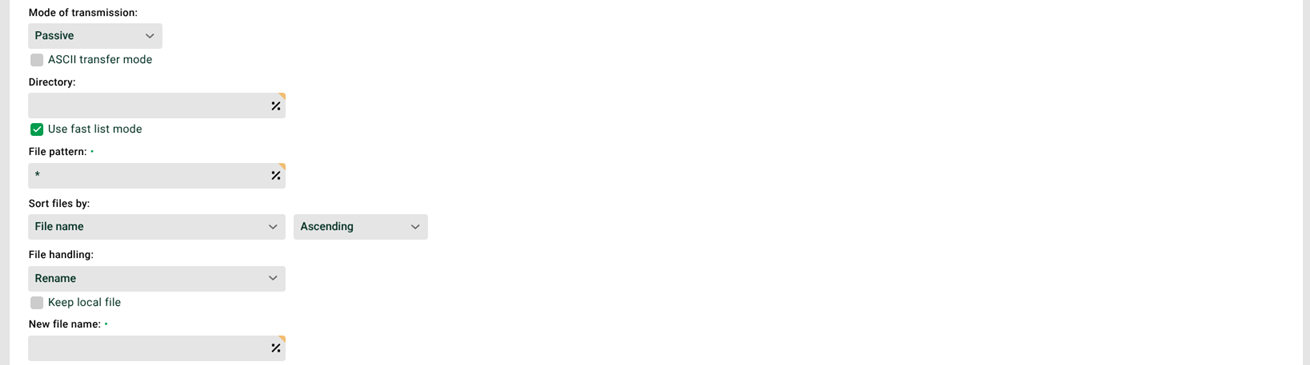
⑥ Mode of transmission: In passive mode, the client establishes the control connection and the data connection. In active mode, the server establishes the data connection. The firewall on that side can block the required port. In ASCII transfer mode, the system converts platform-dependent text formats and special characters.
⑦ Directory: The directory in which the profile searches for the files. Variables with prefix MSG_CALL_ and placeholders (see File names, file patterns, paths, placeholders) for dates are allowed. The system initializes other variables only in Phase 3. Example: ./ftp/@MSG_CALL_VAR_DATA@.
⑧ Use fast list mode: The system uses the FTP command NLST instead of LIST to create the file list. This creates the file list faster. However, the system then receives only the file names and no other information, for example whether an entry is a directory. The response of the LIST command is not standardized. Parsing the received data can therefore cause problems. Fast list mode eliminates errors of this kind.
⑨ File pattern: File name pattern. Example: *.txt|*.asc. In addition, you sort the files for processing by file name, either in ascending or descending order. Alternatively, the system uses the order supplied by the FTP server.
⑩ File handling: The system handles the file it has read in one of the following ways.
Do not delete: The system does not delete the file it has read. It does not delete an existing control file either.
Delete: The system deletes the file it has read and an existing control file.
Rename: The system renames the file it has read. You specify the new file name in the associated input field. The system neither deletes nor renames an existing control file. Use the following placeholders to refer to the name of the processed file:
<file>is the full name of the processed file.<file-prefix>is the name of the processed file without the file extension.
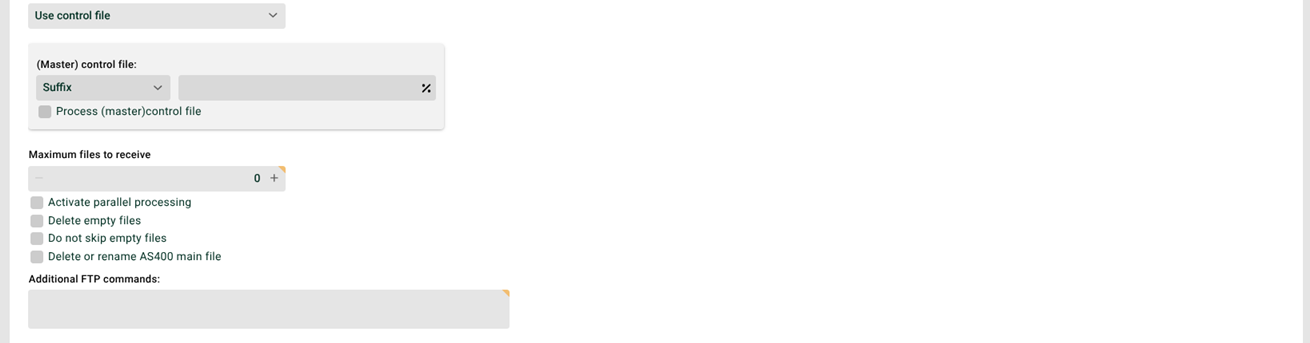
⑪ Use control file: If this checkbox is set, the system reads a file only when the associated control file exists. With the value Do not delete in ⑩, the control files are also retained. See the example in ⑫ and the System variables VAR_SYS_CTRL_FILE.
⑫ Master control file: Suffix or prefix of the control file. You must specify the dot in the suffix explicitly. Example: If you enter the suffix .ctrl in the field, the system searches for the control file name1.txt.ctrl for the file name1.txt.
⑬ Process master control file: If this checkbox is set, the system does not expect one control file per file, but one control file for the whole directory. The job starts as soon as this file exists in the directory ⑦.
⑭ Activate parallel processing: If this checkbox is set, several instances of this profile can work in parallel. The checkbox "Profile may only run in one instance" (see General (Main settings)) must not be set for this profile.
⑮ Delete empty files: If this checkbox is set, the system deletes empty files on the remote system. This applies regardless of the setting in ⑩.
⑯ Do not skip empty files: If this checkbox is set, empty files also generate jobs. In a DMZ environment, you control the behavior with a startup option in the configuration file ./etc/startup.xml of the DMZ machine.
<!-- Defines how to handle empty FTP, SSH and OFTP files (0=skip, 1=delete, 2=transfer) -->
<Set name="handleEmptyFiles">0</Set>0(skip, default): The empty file remains on the DMZ server. The system writes a log entry inDmzEvents.1(delete): The system deletes the empty file on the DMZ server.2(transfer): The system transfers the empty file to the profile. The setting in ⑯ then applies.
⑰ Delete or rename AS400 main file: Specifies whether the system deletes or renames the main file after it has fetched the files.
CAUTION: The system deletes the main file even if it contains files that do not match the file pattern ⑨.
⑱ Additional FTP commands: Here you specify additional FTP SITE commands and standard FTP commands according to RFC 959. Which SITE commands are possible depends on the respective FTP server. With SITE HELP, the FTP server sometimes provides a list of its specific SITE commands.
IMPORTANT: You cannot use additional FTP commands with the protocol SFTP ①.
If you specify the command
somecommand, the system sendsSITE somecommandinternally.For standard FTP commands, use the prefix
rfc:. If you specifyrfc:CDUP, the system sendsCDUPinternally.With the prefix
before:, the system sends the command before the file transfer, otherwise afterwards. To sendCDUPbefore the transfer, usebefore:rfc:CDUP.For the additional commands, you can also use variables from the profile in the form
@MSG_CALL_VARNAME@.When sending commands, the system checks the return code of the server. It accepts all values
2xxexcept202. For other values, the profile generates an error.The system does not check whether the SITE commands themselves succeeded. If a SITE command fails, Lobster Integration does not generate an error. An IO exception is the exception.
Further notes
NOTE:
Some FTP servers also provide subdirectories without making them recognizable. The profile then tries to run jobs for files that do not exist. Request the long file list from these FTP servers to prevent this.
If file handling is set to Do not delete, then delete or rename the file on the FTP server yourself after it has been read successfully. This also applies to an existing control file. Otherwise, the profile processes it again on the next run.
If deleting or renaming the file fails, no job starts. This happens, for example, when a file of the same name already exists during renaming. If "Cron job is considered an error if no data is found" (see Options) is set for the Input agent, this leads to an error. That also applies when a file to be processed exists.
This input agent can check the input files for a maximum size. See Maximum size of input files and messages.
Files that the system cannot assign to any profile are stored in the “Unresolved” area. See also Warning for non-assignable input data.
You use FTP SITE commands in the same way as in the Response FTP .
Dealing with timeouts due to extremely large files
When transferring extremely large files via DMZ, the communication between Lobster Integration and DMZ can run into a timeout.
CAUTION: We advise against the following solution, because it can lead to a loss of performance.
The default timeout is 30 minutes. This is how long Lobster Integration waits for a response from the DMZ server. If the file has not been transferred completely between DMZ and partner by then, Lobster Integration aborts with an error message. For a longer waiting time, start the Integration Server with an additional system property.
-Dhub.datawizard.remote.waitTime=<waiting time in ms>The communication between Lobster Integration and the DMZ server may also fail for two other reasons: The FTP service of the DMZ server does not use the default port 21, or a firewall does not allow the connection in passive mode. You configure both settings with additional system properties when you start the Integration Server.
-Dhub.datawizard.remoteFtp.port=<port number>
-Dhub.datawizard.remoteFtp.passive=true|false