You can configure a class that creates an internal cron job. This job runs without a Profile and deletes old files. A legacy class and a more powerful new class are available. Deleted files are permanently removed.
Legacy class
Use the new class for new developments.
Activate the following section in the configuration file ./etc/cron.xml. This defines a cron job that deletes old files every 10 minutes.
...

<Call name="addJob">
	<Arg>
		<New class="com.ebd.hub.services.cron.CronJob">
			<Arg>Remove files</Arg>
			<Arg>
				<New class="com.ebd.hub.services.cron.DeleteFilesCronJob">
					<Set name="configFilename">./conf/sample_delete_cron_old.properties</Set>
				</New>
			</Arg>
			<Call name="setTimeSchedule">
				<Arg>
					<New class="com.ebd.hub.services.cron.Schedule">
						<Arg type="long">600000</Arg>
					</New>
				</Arg>
			</Call>
		</New>
	</Arg>
</Call>

...
Specify the path to a properties file in parameter configFilename. This file contains the specific settings for deletion.
# sample config for cron job to delete files within named directory
# define the entry folder to look for
directory=./tmp
# do this for sub folders within named directory as well
recursive=true
# define file pattern for selecting files
file.pattern=*.tmp
# files older than 7 days are being removed
retain.days=7
New class (DeleteFilesCronJobWithPathSupport)
Insert the following section in the configuration file ./etc/cron.xml.
...
<Call name="addJob">
    <Arg>
        <New class="com.ebd.hub.services.cron.CronJob">
            <Arg>Remove files</Arg>
            <Arg>
                <New class="com.ebd.hub.services.cron.DeleteFilesCronJobWithWildCardSupport">
                    <Set name="configFilename">./conf/sample_wildcard_delete_cron.properties</Set>
                </New>
            </Arg>
            <Call name="setTimeSchedule">
                <Arg>
                    <New class="com.ebd.hub.services.cron.Schedule">
                        <Arg type="long">600000</Arg>
                    </New>
                </Arg>
            </Call>
        </New>
    </Arg>
</Call>
...
Cron job name
The CronJob class sets the name of the cron job. In this case, the name is "Remove files".
Cron job interval
The Schedule class sets the cron interval in milliseconds. In this case, 600000 milliseconds equal 10 minutes.
Configuration file
The properties file defines the detailed parameters of the class. Specify this file in parameter configFilename.
Example 1:
directory=./var/logs
file.pattern=*.log
exclude.pattern=*.tmp;important/*
retain.days=30
recursive=true
verbose=false
This simple configuration is backward compatible. You can use the properties files from the legacy class.
Example 2:
# Default/Global settings (optional fallback)
retain.days=30
recursive=true
verbose=true
# Path configuration 1
path.1.directory=./var/logs/application
path.1.pattern=*.log;*.txt
path.1.exclude=important/*;*backup*
path.1.retain.days=7
path.1.recursive=true
# Path configuration 2
path.2.directory=./var/logs/system
path.2.pattern=*.log
path.2.exclude=critical/*;audit/*
path.2.retain.days=90
path.2.recursive=false
# Path configuration 3
path.3.directory=./tmp/cache;/tmp/temp
path.3.pattern=*.*
path.3.retain.days=1
The advanced settings let you define multiple deletion paths with specific parameters. If you do not set an optional parameter for a path, the respective global default value applies.
Parameters (global defaults)
Parameter | Type | Default | Description |
|---|---|---|---|
directory | String | No default value. | (mandatory) Semicolon-separated list of directories to monitor. The job skips directories that do not exist. |
file.pattern | String |
| (optional) Semicolon-separated file inclusion patterns. |
exclude.pattern | String | No default value. | (optional) Semicolon-separated file exclusion patterns. |
retain.days | Integer |
| (optional) Number of days to retain the files. Must be ≥ 1. The job skips execution for zero or negative values. |
recursive | Boolean |
| (optional) Scan subdirectories recursively? |
verbose | Boolean |
| (optional) Enable detailed logging? |
Parameters (path-specific)
The placeholder N can range from 1 to 100.
Parameter | Type | Description |
|---|---|---|
path.N.directory | String | (mandatory) Semicolon-separated list of directories to monitor. The job skips directories that do not exist. |
path.N.pattern | String | (optional) Semicolon-separated file inclusion patterns. Overwrites the global parameter |
path.N.exclude | String | (optional) Semicolon-separated file exclusion patterns. Overwrites the global parameter |
path.N.retain.days | Integer | (optional) Number of days to retain the files. Overwrites the global parameter |
path.N.recursive | Boolean | (optional) Scan subdirectories recursively? Overwrites the global parameter |
Pattern matching
Pattern | Description | Match |
|---|---|---|
| Matches any characters. |
|
| Matches any file with a file extension. | Matches all files with a dot in the name. |
| Matches files that start with "test". |
|
| Matches files that contain "backup". |
|
Patterns that contain / are matched against the full relative path.
Pattern | Description | Match |
|---|---|---|
| Temp files in subdirectories. |
|
| All files in temp folders. |
|
| All files in the "important" directory. |
|
| All files in directories whose name contains "backup". |
|
Use the prefix regex: for complex patterns. Incorrect regex patterns cause errors.
file.pattern=regex:.*\.(log|txt)$
exclude.pattern=regex:.*_(backup|archive)_.*
Where can I see my cron job?
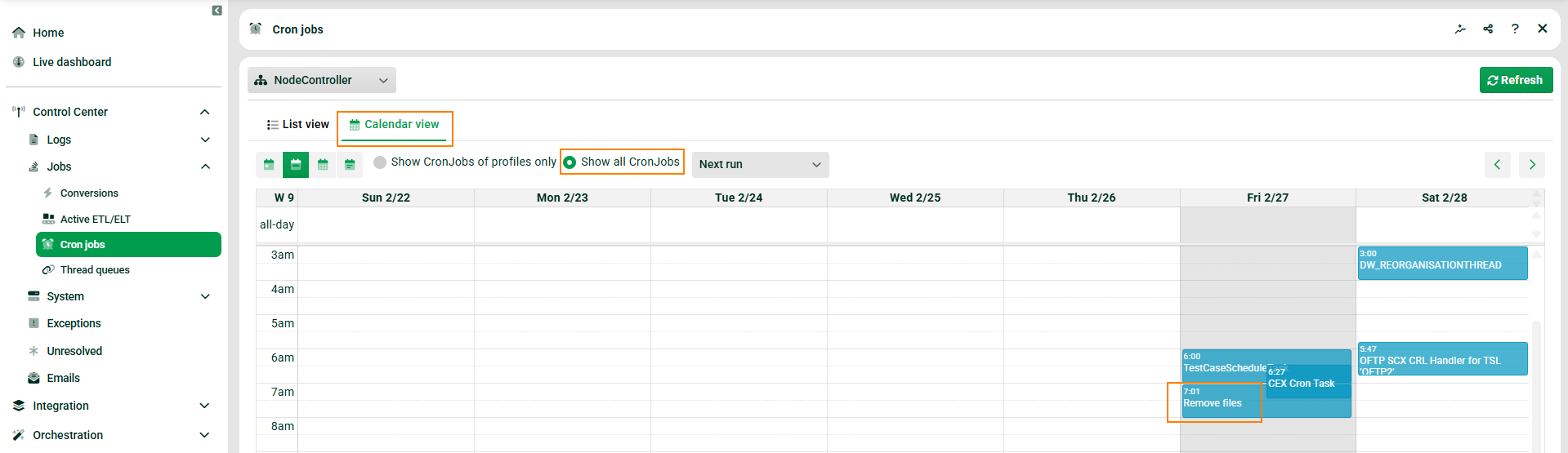
To see your cron job, navigate to Control Center > Jobs > Cron jobs. Select Calendar view and enable the option Show all cron jobs. This is necessary because it is an internal cron job, not a profile cron job.
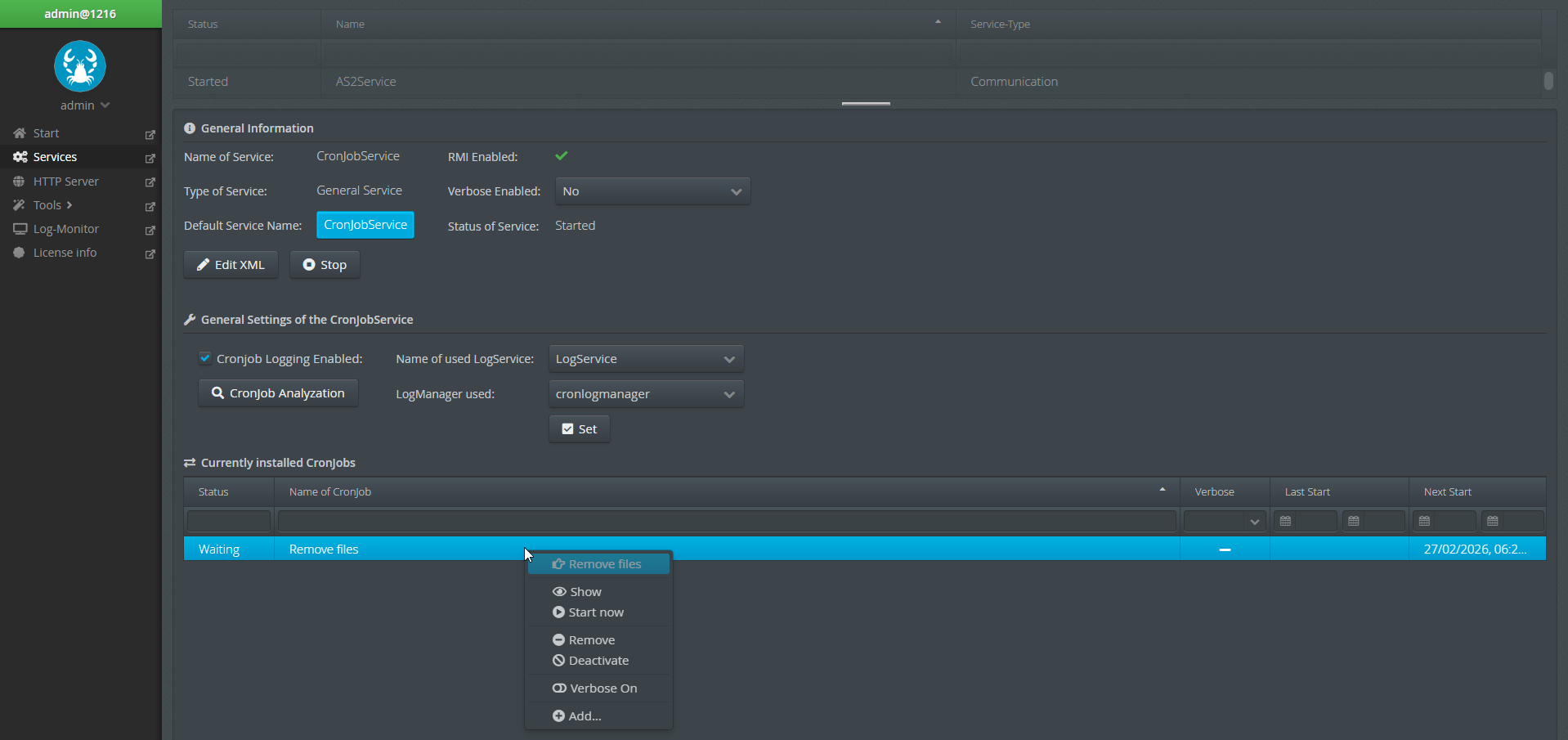
Another option is to navigate to Administration > Admin console and then to Services > CronJobService.
Logging
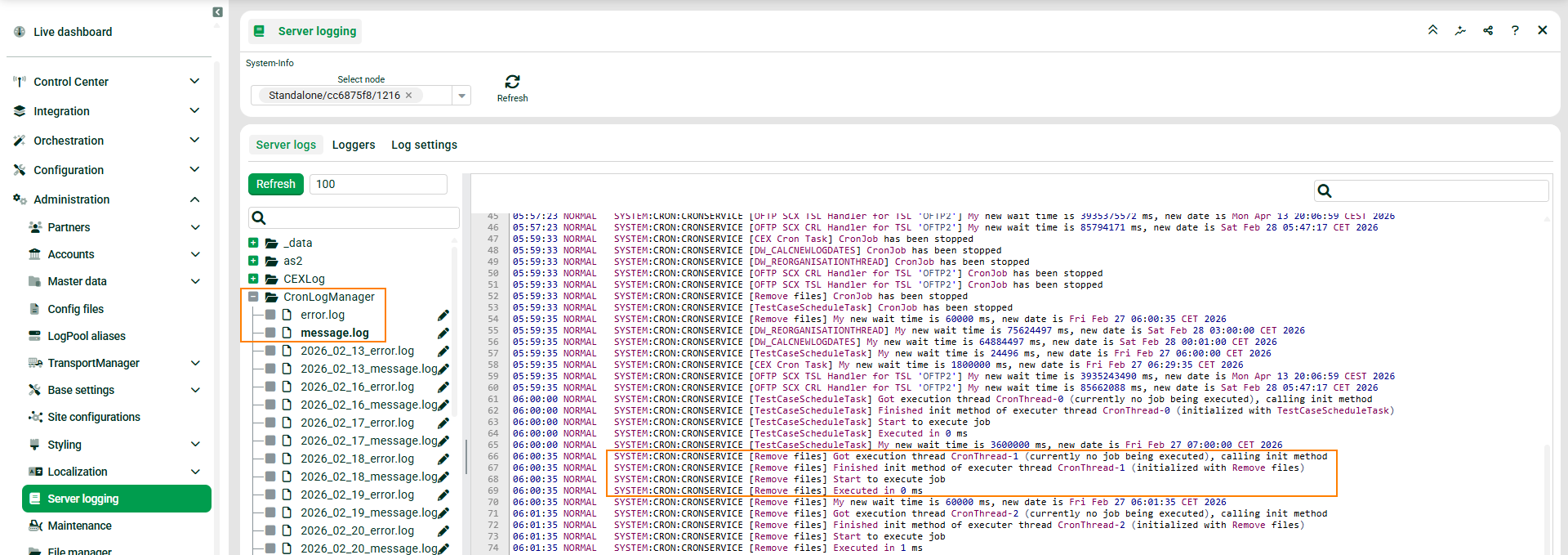
To view the log messages of your cron job, navigate to Administration > Server logging > CronLogManager.
General usage examples
Example 1: Clean application logs
# Clean logs older than 7 days, keep important logs
directory=./opt/app/logs
file.pattern=*.log;*.out
exclude.pattern=error.log;fatal.log;important/*
retain.days=7
recursive=true
verbose=true
Example 2: Multiple directory cleanup
# Default settings
retain.days=30
recursive=true
# Application logs - keep 7 days
path.1.directory=./var/log/myapp
path.1.pattern=*.log
path.1.exclude=audit/*;security/*
path.1.retain.days=7
# System logs - keep 90 days
path.2.directory=./var/log/system
path.2.pattern=*.log
path.2.retain.days=90
# Temp files - delete after 1 day
path.3.directory=./tmp/app;./tmp/cache
path.3.pattern=*.*
path.3.retain.days=1
Example 3: Advanced exclusions
directory=./data/uploads
file.pattern=*.*
exclude.pattern=*important*;*/archive/*;*/backup/*;permanent/*
retain.days=14
recursive=true
Example 4: Regex-based cleanup
directory=./logs
file.pattern=regex:^(debug|trace)_.*\.log$
exclude.pattern=regex:.*_(critical|fatal)_.*
retain.days=3
recursive=true