This Input agent reads the input data from a remote computer over SCP. In principle, it works like the File (cron input agent). In addition, it encrypts the login on the target system and the data transfer.
Data that the system cannot assign to a Profile goes to the “Unresolved” area. See also Warning for non-assignable input data.
Settings
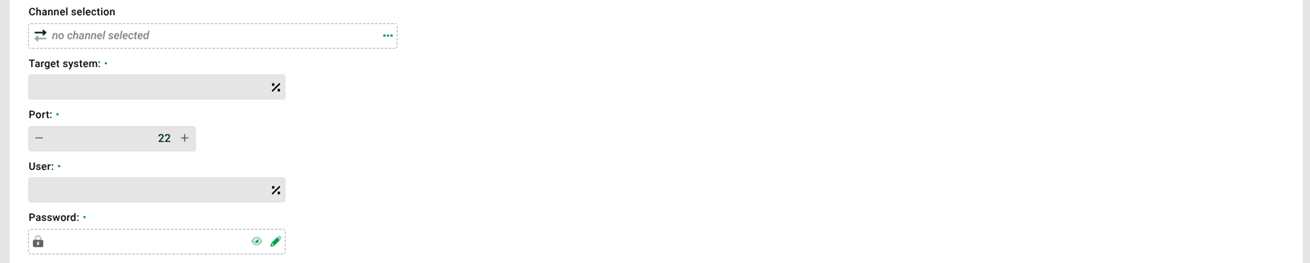
① Channel selection: SSH channel for the connection to the target system ②.
② Target system: IP address or URL of the target system.
③ Port: Port the target system listens on. The following rules apply:
Port
0with no channel selected: the default port from./etc/ssh.xmlapplies.Port
0with a channel selected: the port from the channel applies.Port greater than
0: that value applies.
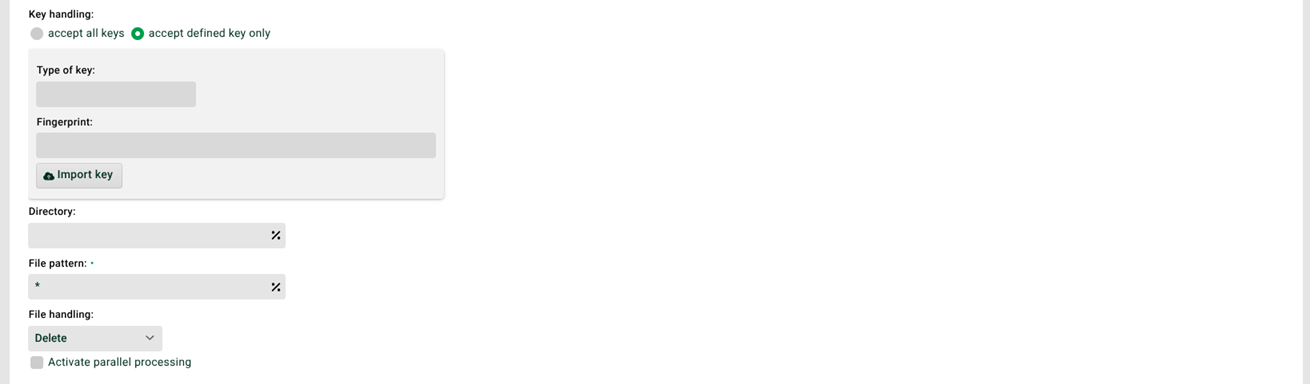
④ Key handling: Defines whether the system accepts all keys or only certain ones. For certain keys, the settings in ⑤ through ⑦ apply.
⑤ Type of key: Indicates what type of key it is. So far, the system supports only type RSA.
⑥ Fingerprint: The key the system expects from the server. If the server delivers a different key, the connection is not established.
⑦ Import key: Gets the key type and the key from the specified target system. The system stores both values in the profile. If you change the target system or the key, adjust the profile accordingly. If several profiles access a server over SCP, each profile stores these values independently.
⑧ Directory: The directory the profile searches for files. You cannot specify multiple directories. The system resolves all timestamp components (see File names, file patterns, paths, placeholders) such as <yyyy> or <dd>.
⑨ File pattern: Pattern that defines which files the profile accepts in the target directory. You cannot specify multiple file patterns here.
⑩ File handling: The system handles the file it has read in one of the following ways.
Delete: The system deletes the file it has read.
Do not delete: The system keeps the file. Remove the file yourself in that case. Otherwise, the profile reads it again on the next run.
Rename: The system renames the file. You specify the new file name in the associated field. Use the following placeholders to refer to the name of the processed file:
<file>is the full name of the processed file.<file-prefix>is the name of the processed file without the file extension.
CAUTION: If deleting or renaming the file fails, no job starts. This happens, for example, when a file with the same name already exists. If "Cron job is considered an error if no data is found" (see Options) is set for the input agent, this leads to an error. That also applies when a file is waiting to be processed.
⑪ Activate parallel processing: If this checkbox is set, several instances of this profile can work in parallel. The checkbox "Profile may only run in one instance" (see General (Main settings)) must not be set for this profile.